How to Delete/Remove Emails from MBOX files?
Eliminate unnecessary copies of emails from MBOX/ MBS/ MBX/ MSF files with the smartest process. SysInspire MBOX Duplicate Remover software, the automatic way to find duplicates from multiple MBOX files and delete them at once.
Software More Info Download Now Buy Now
De-duplicate emails from MBOX files (up to 25) with zero charges using demo edition.
Step-1) Download and run this windows based SysInspire MBOX Duplicate Remover Software
Press the "Add File/Folder" button

Step-2) Select an MBOX file importing mode: -
- Select MBOX file: - Add one MBOX file at one time.
- Select MBOX Folder: - Add a folder containing multiple MBOX files.
- Auto Load Thunderbird Profile: - Import all mail folders/files from Thunderbird profile's storage location
Import MBOX files with your choosen option and click on Next.

Step-3) Import MBOX files and load mail folders from the selected files.

Step-4) Open each email and view them separately in preview panel.
Choose required MBOX mail folders and press Remove Duplicates button.

Step-5) Apply the needed de-duplication settings: -
- Email Duplicate Search Options
- Search in MBOX file or across folders
- Mail filtering
- Saving Location
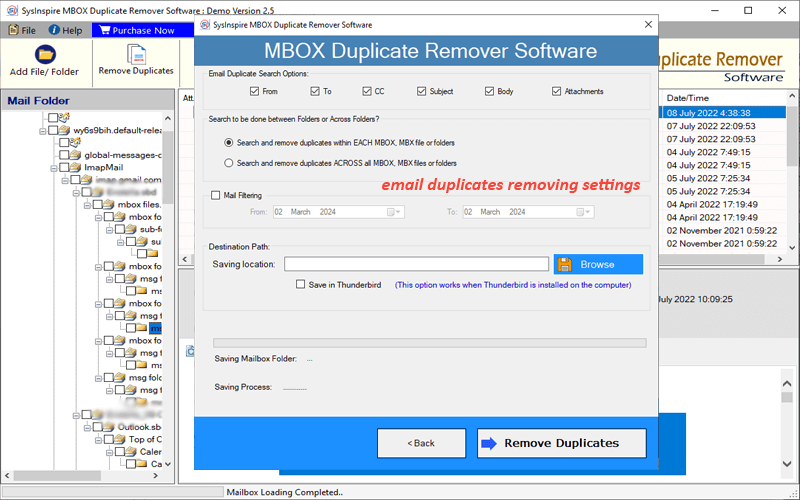
Step-6) Lastly, click on Remove Duplicates button and erasing email duplicates from MBOX files.

If you need any kind of assistance, then please connect with us - Contact US