SysInspire
MBOX Duplicate Remover Tool
De-duplicate emails and erase unwanted copies of emails from MBOX files. Advanced utility to remove duplicate emails from MBOX/ MBX/ MSF/ MBS and other MBOX file types. Easily perform email duplicate deletion jobs within each MBOX or across multiple MBOX folders.
(Average Rating 4.9 Based on #546 Reviews)

MBOX Duplicate Remover Software- Best Features

- Instantly de-duplicate emails from all types of MBOX files/mail folders.
- Delete email duplicates within MBOX file and across multiple MBOX files.
- Add MBOX file for email de-duplication with 3 options: Select MBOX file, Select MBOX folder and Auto-Load Thunderbird profile.
- Auto-detect and load Thunderbird profile's mail folders and remove duplicate emails from them.
- Open MBOX files and read their emails with all the information associated with them.
- Select specific mail folders and perform email de-duplication only from chosen folders.
- Email duplicates search based on the attributes- From, TO, CC, Subject, Attachments, and body.
- Filter emails from MBOX files by their dates and remove duplicate emails of a specific date range.
- Save resultant files with 2 options- “Save in Thunderbird” or “Manually Select Saving Location”.
- Support deleting email duplicates from all MBOX variants- MBOX, MBX, MBS, MSF, and others.
- User-friendly tool and anyone can use it to perform email de-duplication tasks with ease.
- Access software on any edition of Windows O/S – Win 11, 10, 8.1, 8, 7, XP, Vista, and older.
Free Demo: - Erase emails duplicate (up to 25) from each selected MBOX file with zero charges.
MBOX Email Duplicate Remover software- Features with details
Instant Email De-Duplication from MBOX files
Delete unwanted copies of emails accidentally created in MBOX files in the smartest way. Using the MBOX Duplicate Eraser, find duplicates of emails and remove them from MBOX easily. Delete email duplicates from one or more files in a single process without any effort and mistakes.
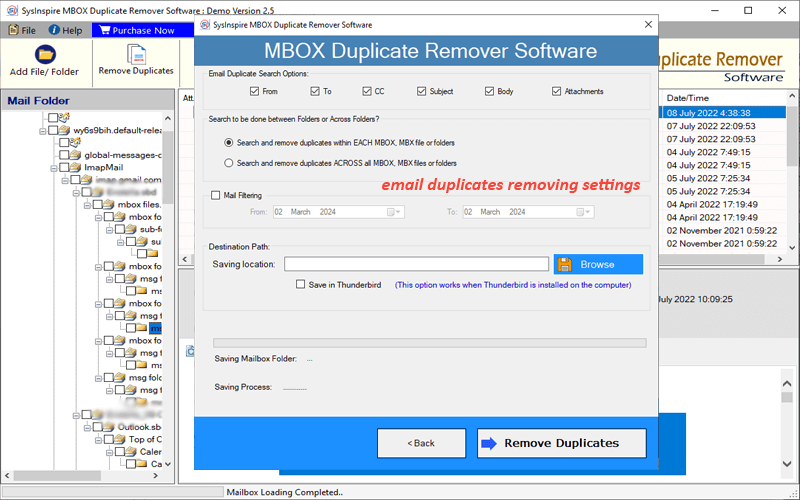
Find email duplicates based on their attributes- TO, CC, Subject, Sender, Body and Attachments. Erase duplicates from each MBOX file or delete across all the selected folders.


Delete MBOX Email with 2 Different Modes
Get the ability to remove email duplicates from MBOX files with 2 available options: -
- Delete Duplicates within each MBOX: - Find duplicate emails in each MBOX file. This process involves identifying duplicates of emails within the same MBOX file and then this process is repeated for each next MBOX file.
- Delete Duplicates across all MBOX files: - Alternatively, select this option to find duplicate emails in all MBOX files. It searches all duplicate emails from the user's selected MBOX folders/files and removes them.

Import MBOX files with 3 Options
Add single or multiple MBOX for removing email duplicates with the options: -
- Select MBOX File: - Insert one MBOX file at a time.
- Select MBOX Folder: - insert a folder holding multiple MBOX files.
- Auto-Load Thunderbird profile: - load all mail folders/files from the Thunderbird profile in one click.

De-Duplicate Thunderbird Emails
Provides a separate option to remove duplicate emails from a Thunderbird-configured profile. The software directly loads all mail folders and files containing Thunderbird profile emails. Like MBOX files it allows users to delete duplicate emails with available deleting options.

Load and Preview MBOX Emails
The software provides a clear preview of the email from the MBOX file with all the related details. It shows each email in a preview panel with all their associated information—header elements (TO, BCC, From, CC, Subject, Date, etc.), message body, attachments, and other elements.

Erase Duplicates from Selective folders
Add folders with multiple sub-folders and select the required folders among them to remove email duplicates. Each imported folder is shown in the left side panel of the software with the complete hierarchical order. Select required folders from the list and delete unnecessary email duplicates from selected folders only.

Duplicate Searching options
The software enables users to find email duplicates among MBOX files based on selected elements of the email. Select options - To, Cc, Sender, Subject, Body and Attachments and find duplicates accordingly. Select one, multiple or all attributes and find duplicates from MBOX with selected options.

De-Duplicate Email Date-wise
Find and delete only duplicates of emails of the selected date range from MBOX files with the mail filter option. Use the Filter Mail by Date function and specify the dates from which you want to find and remove duplicate emails.

2 Different File Saving Modes
The software offers 2 options to store the resulting files obtained by de-duplication: -
- Save to Thunderbird: - Stores the resulting files/folders at the path to Thunderbird's local folder.
- Manual saving location selection: - Choose a location from your hard drive yourself to store the resulting files.

Flawless Email De-Duplication
Makes no changes to the original files or folders resulting in lossless de-duplication. The software scans MBOX folders/files to find duplicate files. Saves a single copy of the duplicate emails found in the scanning result to a user-specified location.

Support of all MBOX Variants
De-duplicate emails from all types of MBOX files generated from any application (Thunderbird, Apple Mail, Google Takeout, Opera Mail, etc.). Remove email duplicates from MBOX, MBS, MBX, MSF and others. Moreover, there is no size limit, so the user can delete email duplicates from MBOX files of any size.

Easy & User's Friendly Layout
An easily accessible interface is available inside the software to perform email duplicate removal tasks effortlessly. Both technical and non-technical users can use the tool for email de-duplication. Remove email duplicates from MBOX files with a simple click process without any prior knowledge.

Windows OS-based software
Software is specifically designed for computers running Windows OS. Any older or newer version of Windows is capable of running the software (including- Windows 11, 10, 8.1, 8, 7, XP, Vista, and older). The software will work the same on every Windows version and provide the best results for removing MBOX email duplicates.
Remove MBOX Email Duplicate Free
The demo version performs email de-duplication from MBOX files via MBOX Duplicate Remover for free. It will help users get a quick analysis of the software features and functions. Easily use the tool with the demo edition and remove duplicates of up to 25 emails from each folder without spending a single penny.
Free Download SysInspire MBOX Duplicate Remover Software

*Demo Limitation: Remove 25 email duplicates from each chosen MBOX file with free demo version.
Software Specification
Software Info
Name
MBOX Duplicate Remover software
Version
v1.0
Language Supported
English, German, Italian, French, Spanish
System Requirements
Processor
Intel® Pentium Class
Operating System
Windows 11, 10, 8.1, 8, 7, XP, Vista, etc
Hard Disk Space
150 MB of free hard disk space
RAM
Minimum 2 GB is required
Software Delivery
Electronic
YES
Mode
Delivery by E-mail
Supported Editions
Win 11 & All Below Windows Versions
Trial Limitations
Erase duplicates of upto 25 emails from each selected MBOX file/folder free of cost
Software Comparison - MBOX Duplicate Remover software Demo vs Full Version
| Features | Demo Version | Full Version |
|---|---|---|
| Remove Email Email Duplicates from MBOX | ||
| Search and Delete Duplicates within MBOX file | ||
| Search and Delete Duplicates Across All Folder | ||
| Preview emails from MBOX files | ||
| Delete Duplicate from selective folders | ||
| Remove Unlimited Email Duplicates | Delete only 25 email duplicates from each MBOX | |
| Price | Free Download | Buy $49 |
Frequently Asked Question
- Download and run eSoftTools MBOX Duplicate Remover Software.
- Press Add File/Folder and choose a mode of loading MBOX files.
- Import MBOX files with your chosen file-adding mode and click on Next.
- Load mail folders, read emails to check duplicates and select required folders.
- Choose folders and press the Remove Duplicates button from the menu bar.
- Apply the settings- search options, within file or across folder selection, and mail filter.
- Choose a saving option- Save in Thunderbird or Manually select a location.
- Lastly, hit on the Remove Duplicates button and start removing email duplicates.
2 different options are available in the software for finding and deleting email duplicates: -
- Search and Delete within Each MBOX File: - Finds and removes email duplicates from one MBOX file, and then does the same with the next selected MBOX file.
- Search and Delete across all chosen MBOX files/folders: - Its purpose is to find email duplicates and remove them by scanning all selected MBOX files/folders simultaneously.
Yes, this software is capable of removing duplicate emails from all Thunderbird profile mail folders (including SBD folders).
- The software scans the MBOX files/folders (selected by users).
- Find duplicate emails in the selected folders.
- Moves one of those email copies to a new location specified by the user.
This software provides 2 options to save the resulting files before starting an email de-duplication task.
- Save In Thunderbird: - By selecting this option users can store the resulting files in the Thunderbird Local Folders location.
- Manual Saving Location Selection: - Users can select a path from their local drive to save the resulting files.
Our Customer Review's
“I've been struggling to manage my email archives for years, and duplicates were a constant headache. After trying several solutions, I found this MBOX Duplicate Remover tool, and it's been a game-changer! It easily scanned MBOX files, identified all duplicates, and cleaned up mail folders in minutes. Highly recommended!”
Payton Runolfsson
(Spain)"As a professional freelancer, keeping my emails organized is important to my workflow. I was struggling with duplicate emails until I found this Mbox Duplicate Remover. It's intuitive to use and helps me save time. Helps. “This has helped me save many hours of manual cleaning. Thanks to this tool, I can now focus on my work without worrying about a cluttered inbox."
Isabell Larkin
(US)"I manage multiple email accounts for my small business, and over time, dealing with duplicate emails has become daunting. I was initially sceptical about using Mbox Duplicate Remover, but this tool helped meet all my expectations! It efficiently identified duplicates and removed them. Thanks."
Alena Hermann
(Germany)SysInspire MBOX Duplicate Remover Software
SysInspire MBOX Duplicate Remover Software

Add/load MBOX files

MBOX Email Preview

MBOX Email Duplicate Removal options
Remove Email Duplicates from MBOX files
