
Introduction
If you are looking for an excellent tool to Reset a Forgotten 7-Zip File password, read this entire blog post right now; it offers the perfect solution to your problem. Not only is the tool hassle-free to use, but this post also provides a step-by-step guide on how to use it.
What is a 7z file?
A 7z file is a compressed file that puts multiple files into a single archive, making it easier to store and transfer large amounts of data. These files are both secure and efficient. Often, a 7z file is password protected to protect the user’s privacy and to keep the data inside it secure.
Reset a Forgotten 7-Zip File Password
If you’re having trouble accessing your Reset a Forgotten 7-Zip File password, you can use SysInspire 7Z Password Recovery Software to resolve the issue. This tool is designed to handle even the most complex passwords with ease, offering a range of recovery methods like brute force and dictionary attacks. To use it, simply download and install the software, load your locked 7-Zip file, and choose the appropriate recovery method. The process is straightforward and ensures that your data remains intact while you work to recover your password. This user-friendly tool makes it possible for both technical and non-technical users to regain access to their files without damage.
Advance features SysInspire 7z Password Recovery Software
- This software is risk free at a price because this software is tested by humans so that no user data is harmed.
- Using this you can reset 7zip file password in just few steps and unlock your 7zip file in any language whether it is English or non-English.
- Using SysInspire 7z Password Recovery software you can reset any type of 7zip and unlock your 7zip in any characters be it numeric, symbolic or Sepical characters.
- It has many features one of which is Copy to Clipboard which copies the recovered password of your 7zip file in just one click.
- If for some reason this software is not able to recover the password of the 7zip file then you can get your money back within 30 days.
- This software works on all Windows devices Win11, Win10, Win8.1, Win8, Win7, WinXp, Vista and other editions.
Top 3 Methods of 7-Zip File Password Recovery
- Brute Force Attack:- This tool can recover your 7zip file in any characters, no matter how difficult the password of 7zip file.
- Mask Attack:- Using mask attacks you can recover some forgotten characters without any loss.
- Dictionary Attack:- Dictionary attack method recovers the password of your 7zip file by searching it from the dictionary file.
How to use SysInspire 7z Password Recovery Software?
Download this software by clicking on the above link.

After downloading click on the browser button

Now select your password protected 7zip.
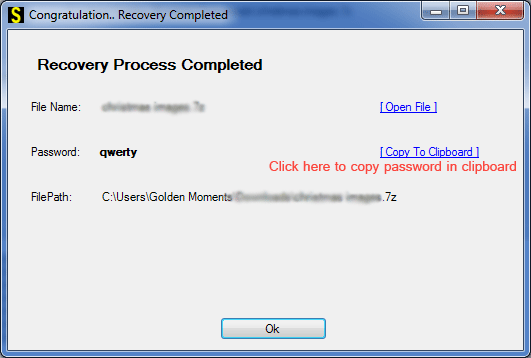
Now click on any one of the three methods given below.
You can open your password protected 7Zip file in just a few steps.
Free Demo Version
Download SysInspire 7z Password Recovery software now and reset the password of your 7zip file and this software also provides free demo to all users so that users can believe that this software is worth its price. In free demo you can recover first three characters of your 7zip file. You don’t have to pay any money to use this.
Frequently Asked Questions
1.What is a 7z file?
A 7z file is a compressed archive used to store multiple files in a single file.
2. Can I recover a forgotten 7-Zip password?
Yes, password recovery software can help recover a forgotten 7-Zip password using different recovery methods.
3. What recovery methods does SysInspire 7Z Password Recovery offer?
It offers Brute Force, Mask, and Dictionary attack methods.
4. Is there a free demo version available?
Yes, the software provides a free demo that can recover the first three characters of the password.
5. Does SysInspire 7Z Password Recovery support special characters?
Yes, it supports passwords containing numeric, symbolic, and special characters.
Conclusion
A useful blog is here we discuss in this blog How to Reset a Forgotten 7-Zip File Password with SysInspire 7Z Password Recovery Software is available for every users to evaluate before making a purchase. With this free trial edition, you may assess the program’s functionality and make sure it meets your needs without taking any chances. This feature lets you decide with confidence whether the product matches your needs for recovering passwords, so you only spend money on solutions that will benefit you.

