Do you have an MBOX file and want to convert it to CSV format? If yes, then you have landed on the right page. In this blog, we have explained an automated method that helps to convert MBOX files to CSV format on Windows. You can manage email data from different email clients to comma-separated values files on your computer.
Overview
MBOX is a popular email file format that stores all emails in a concatenated way. It has become a popular file format supported by many email clients, webmail clients, and other email services. Even Google allows you to take a backup of its data in MBOX format.
CSV is another computer file, It stores email data in text format and is used for database purposes. It stores data in a line known as a record, and each value in a record is separated by a comma. It opens in software like Microsoft Excel, Google Sheets and is supported by Microsoft Outlook.
With this article, you can easily convert a MBOX file that is supported by email clients like Mozilla Thunderbird, Apple Mail to CSV.
Also, Read
Best Way to Convert MBOX Files to CSV Format Easily
With SysInspire MBOX to CSV converter software, you can easily convert MBOX files to CSV format. With a few clicks, you can convert MBOX files to other file formats like EML, EMLX, HTML, MSG, PST, and NSF. Moreover, with this tool, you can export MBOX files to cloud applications like Gmail, Yahoo Mail, and Outlook 365 and an IMAP server.
Key features
- Capable of loading single and multiple MBOX files at a time, and can auto-detect MBOX files from your system.
- Provides a preview of MBOX files and folders in the three-pane panel.
- Has a helpful feature, like email filtering, by which users can filter emails according to Date.
- Supports conversion of MBOX files to multiple file formats like PST, MSG, EML, EMLX, NSF, HTML, etc.
- No restriction on MBOX file size, can add MBOX files of any size.
Step-by-step approach to convert MBOX to CSV
Download and install the SysInspire MBOX to CSVConverter software on your system.
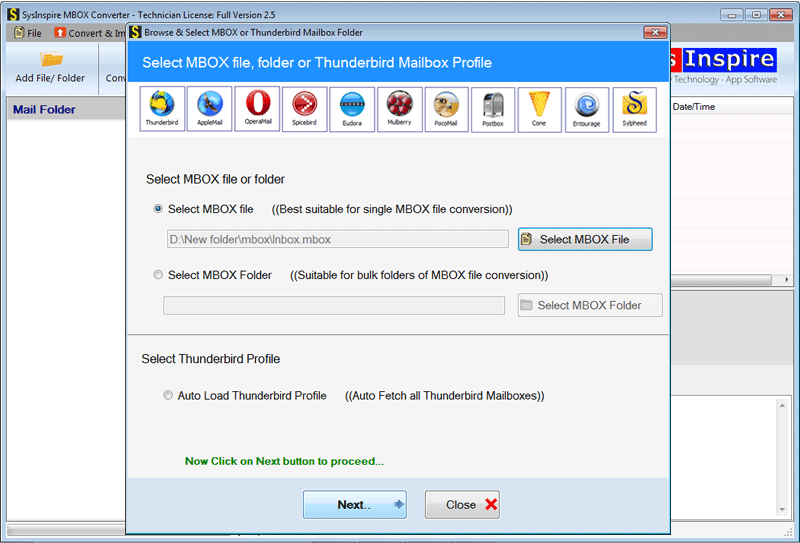
Open and click the ADD File/ Folder button of the software at the start-up screen.

After loading MBOX files in the software, you can click the Next button.

In the preview panel, you can view MBOX files/folders and select the MBOX files/folders to be migrated.
Frequently Asked Questions (FAQs)
1. What is an MBOX file?
An MBOX file is an email storage format that stores multiple email messages in a single file.
2. Why convert MBOX files to CSV format?
CSV format makes email data easier to manage, organize, analyze, and access in applications like Microsoft Excel and Google Sheets.
3. Can I convert multiple MBOX files to CSV at once?
Yes, SysInspire MBOX Converter allows users to add and convert multiple MBOX files simultaneously.
4. Does the SysInspire MBOX Converter support large MBOX files?
Yes, the software allows users to add MBOX files of any size without file size restrictions.
5. Can I preview MBOX files before conversion?
Yes, the tool provides a three-pane preview to view MBOX files, folders, and email contents before conversion.
Conclusion
In this blog, we have explained an automated method to convert MBOX files to CSV format. There are manual methods also available, but they are complex and require technical expertise. You can use an automated method that is a tried and tested method, and you can use the demo version to check how it works.