Introduction
In this blog, we will explain an automated method for easily and efficiently converting PST to MBOX format using an PST to MBOX Converter. We will describe the reasons for conversion and provide a complete step-by-step guide.
Overview—
As we all know many business organizations are using MS Outlook for their email communication and personal information management. Outlook allows users to store their data in two file formats PST & OST.
When Outlook stores data in a PST file, it contains data items such as emails, contacts, calendars, tasks, notes, etc. A PST file is a Personal Storage Table file that stores Outlook data locally on the computer.
MBOX file is supported by a large number of applications on Windows, Linux or Mac. Some programs that support MBOX files are Thunderbird, Sea Monkey, Apple Mail, Spice Bird, Eudora and so on.
As we compare both the MBOX and PST files, the MBOX file is better than the PST file because when the PST file becomes corrupted or inaccessible, it may not open properly in Outlook. And MBOX file can be opened in any email client supporting it.
Reasons for PST to MBOX Conversion
- PST files are more prone to corruption.
- PST files are only opened in the Outlook email client and MBOX files are opened in many email clients like Thunderbird, Sea Monkey, Apple Mail, Spice Bird, etc.
- PST files do not directly open in Outlook, they open only after OST to PST Conversion.
Best and Automated Method to Convert PST File to MBOX Format
The best and most automated method to convert PST File to MBOX Format is the SysInspire PST to MBOX Converter software. With a few clicks, you can convert PST File to MBOX format with this tool. You can convert PST to MBOX format without the installation of Outlook installed on your system. There is no need for any third-party application to convert PST to MBOX.
Best and Attractive features of the software
- Easily converts inaccessible, orphans and encrypted PST to MBOX files.
- Converts multiple PST files to MBOX format at a time.
- Provides the option of converting an PST file to a single MBOX file.
- Provides the preview of all the files/folders of the mailbox in the PST file in the preview panel.
- Allows to convert PST files to MBOX and other file formats such as EML, EMLX, HTML, MSG, TGZ, PST, etc.
- Capable of migrating PST files to other cloud-based applications like Microsoft 365 (Office 365), Outlook.com, Gmail, Yahoo Mail, and IMAP applications.
- Supports PST files of all editions of MS Outlook 2021, 2019, 2016, 2013, 2010, 2007, and below editions.
- Compatible to work with all editions of Windows Operating System like Windows 11, 10, 8.1, 8, 7 & below versions.
Steps to convert PST to MBOX Automatically
Download and launch PST recovery software in your system.

Click on the Select PST button from the menu bar.

Select the file and click the Next button to start the scanning process.
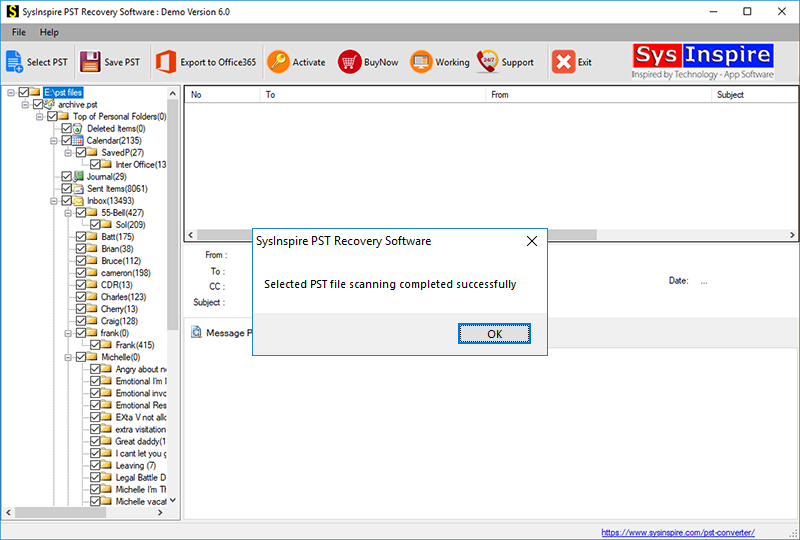
Get the preview of files/folders of the PST file, select the files and folders that you want to convert and press the save PST button.
FAQ – (Frequently Asked Questions)
Is it necessary to have Outlook installed?
No, Microsoft Outlook does not need to be installed to run this software. It is a standalone tool.
Can I preview the emails before conversion?
Yes, you can view each email and its details in the software’s preview panel before conversion.
Is a free trial version available?
Yes, the free demo version allows you to convert the first 25 items of each folder into MBOX format. This enables you to check the performance beforehand.
Conclusion
In this blog, we have explained the best and most reliable automated method to Convert an PST File to MBOX Format. In this software, you can convert PST files to other file formats and migrate PST files to cloud-based applications. In the demo version, you can convert 25 files from each PST file folder to convert and migrate and if you like it you can purchase the software.