
Posted by sysinspire
Posted on: October 9, 2026
Categories: 7z password, Password Recovery Tools
Reading Time: 6 minutes
Introduction
Have you forgotten your original password for 7z file and want to quickly recover your password from the password-protected 7zip file? If you are worried about not being able to Extract a Locked 7z Archive Step by Step, now you can. Your 7z file can be recovered without damaging your data and with great results in very little time. Today, I will share a result-oriented way to extract password protected 7z file using a smart, automated software solution.
What is a 7z file?
A 7z file is a compressed file that puts multiple files into a single archive, making it easier to store and transfer large amounts of data. These files are both secure and efficient. Often, a 7z file is password protected to protect the user’s privacy and to keep the data inside it secure.
Read, Also
Top Solution for Recovery 7z Passwords: SysInspire 7z Password Recovery Software
With SysInspire 7z Password Recovery Software, you can quickly and easily recover any length and combination of password from 7Zip file without worrying about losing your data. The software has several unique features to make the 7z password recovery process smooth, efficient and gives the opportunity to extract password protected 7z file with original password. Plus, you can try all these features with a free demo version before buying. All the features are listed below for your convenience.
Best Features of SysInspire 7z Password Recovery Software-
There are various unique features are enrolled in the software that will help users to easily track forgotten 7z file password and open locked 7zip archive files. The main features are mentioned below-
- Recover all types 7zip:- With the help of this software you can recover any type of protected 7Zip archive files and extract password protected 7z file without losing any data.
- Password Recover with Easy Steps:- This software recovers the password from locked 7zip file within a short time and in a few steps and that too without damaging any data.
- Recover Multilingual Password:- 7z Unlocker tool supports multilingual password recovery which means software recovers English characters and non-English characters of passwords.
- Recover Numbers and Special Characters: This software recovers the password of a 7zip file using all types of characters, such as alphanumeric, numerical, symbolic, and special character passwords.
- Copy Password to Clipboard Option: SysInspire 7z Password Recovery Software also provides the option to copy the recovered password to the clipboard, which enables us to avoid character confusion and directly unlock 7z files.
- Works on all Windows editions: This software can work on all editions of Windows OS, such as Win 11, Win 10, Win 8.1, Win 8, Win 7, Win XP, Vista, and others.
- Money-back Assurance: All 7z password recovery tool licenses are assured with a 30-day money-back policy. So do not worry while buying because the tool gives you the full functionality of extract password protected 7z with assured money-back.
- Risk-free Software: The software has been tested with multiple parameters and across various OS editions, ensuring that it is free from spyware, malware, and adware toolkits.
Innovative Recovery Techniques Used by Software
SysInspire 7z Password Recovery Software has inbuilt multiple types of password recovery algorithms to help users easily decode the original password from 7z archive files and allowing to Extract a Locked 7z Archive Step by Step. The tool works fast and searches for the same password the user set earlier. Here are the most popular techniques used by the software-
- Brute Force Attack: This is the most popular method for decrypting the forgotten 7z archive password. Through the Brute Force technique, the software searches all possible characters, including letters, numbers, and special characters, to track the 7z file password.
- Mask Attack: Through the mask attack, the user can reduce the time frame of password recovery and get the password quickly. In this method, the user has to set the exact password limit with a few wild cards.
- Dictionary Attack: The software has built millions of default password strings, and it tries to find the password from the dictionary file. This attack is much faster than Brute Force and Mask attacks but only works if the password is within the dictionary file.
How to use SysInspire 7z Password Recovery Software?
Download this software by clicking on the above link.

After downloading click on the browser button

Now select your password protected 7zip.
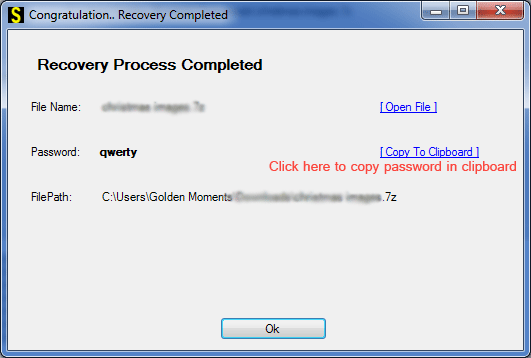
Now click on any one of the three methods given below.
You can open your password protected 7Zip file in just a few steps.
Availability of Free Demo Version
SysInspire 7z Password Recovery Software is available in a freeware version for download and tests with the 7z locked files. The demo version of the software permits users to extract password protected 7z, but as they are the demo version, this will show only the first three characters of the password. It is highly recommended that licensed software be used to see the entire set of recovered passwords.
Frequently Asked Questions (FAQs)
1. What is a 7z password recovery tool?
A 7z password recovery tool helps recover forgotten passwords for password-protected 7z archives.
2. Can I recover a forgotten 7z file password?
Yes, you can try password recovery software to find the forgotten password using different recovery methods.
3. Which methods are used to recover 7z passwords?
The common methods are Brute Force Attack, Mask Attack, and Dictionary Attack.
4. Does SysInspire 7z Password Recovery Software support special characters?
Yes, according to the blog, the software supports passwords containing numbers, letters, and special characters.
5. Is a free demo version of SysInspire 7z Password Recovery Software available?
Yes, the demo version is available, but it displays only the first three characters of the recovered password.
Conclusion
Without an expert solution, the only options are to remember or retrieve the password if you have it written down somewhere. Otherwise, using professional tools is the best approach. SysInspire 7z Password Recovery Software is the top choice for recovering and Extract a Locked 7z Archive Step by Step. This blog explored the software’s features, which support multilingual password recovery. It is highly recommended that users try the demo version of the software to test it with their locked 7z files.

