
Introduction
If you are worried because your 7z file is locked with a password and you have no idea what the exact password is, there is now software that will quickly recover the 7z file password and allow you to open locked 7z files with the original password. While using the software, you will realize how easily you can retrieve your 7z file password, even if you don’t know it.
What is a 7z file?
A 7z file is a compressed file that puts multiple files into a single archive, making it easier to store and transfer large amounts of data. These files are both secure and efficient. Often, a 7z file is password protected to protect the user’s privacy and to keep the data inside it secure.
Read, Also
Unlock a Locked 7z Archive Without Password
SysInspire 7z Password Recovery Software includes many features to help users Unlock a Locked 7z Archive Without Password. The tool offers three unique features: Brute Force Attack, Mask Attack, and Dictionary Attack. All these features are designed with highly advanced algorithms to easily detect and reveal the exact password.
Advanced Key Features of SysInspire 7z Password Recovery Software
- SysInspire 7z Unlocker is a smart solution that offers various features to recover any type of password, regardless of its length. The software works quickly and takes a very short period to reveal the original password.
- Our software is thoroughly tested on multiple operating systems and devices to achieve the best quality recovery techniques. Our software ensures that you won’t face any issues while using it to unlock 7z files. This software keeps your data safe and ensures data protection while recovering 7zip file passwords.
- This software supports recovery of 7Z file passwords for non-english characters so that you can recover passwords in any language whether it is English or non-English password phrases.
- Our software is made only for users who use Windows Operating System. The software runs smoothly on Windows computers and performs the best 7z password recovery. Software is easy to install on every Windows OS including Win 11, Win 10, Win 8.1, Win 8, Win 7, Win XP, Vista, and other editions.
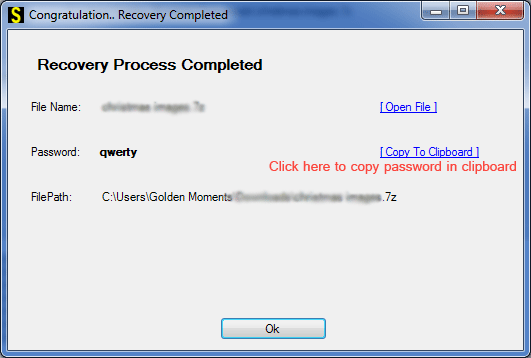
- This software also provides a function like a copy to clipboard using which you can copy your password in a single click and apply on the password protected 7z files to open it easily.
Three Powerful Recovery Methods to Unlock a Locked 7z Archive Without Password
- This brute force attack is a very good and very useful method acquired by the software which provides user comfortability whether user has no idea about the software. This method recovers the password in all types of characters, special symbols, numerals, etc which helps a lot in recovering the password.
- If you know the starting or ending characters of the password then you can use this Mask Attack method and your password will be recovered in short period of them with just 2-3 steps.
- This method is very helpful, it tracks the passwords from 10-millions English predefined dictionary words. You can recover your 7Z file within a short time.
How to use SysInspire 7z Password Recovery Software?
Download this software by clicking on the above link.

After downloading click on the browser button

Now select your password protected 7zip.
Now click on any one of the three methods given below.
You can open your password protected 7Zip file in just a few steps.
Free Demo Version
Our software provides a Free trial which is absolutely free and there is no cost involved so that our customers can be confident that our software works and it recovers the first three characters of the 7Z file password.
Frequently Asked Questions (FAQs)
Q1. How can I unlock a locked 7z archive without a password?
You can use 7z password recovery software to recover a forgotten password and access your locked archive.
Q2. Which recovery methods does SysInspire 7z Password Recovery offer?
It offers three methods: Brute Force Attack, Mask Attack, and Dictionary Attack.
Q3. Can SysInspire recover passwords containing special characters?
Yes, the software claims to support passwords containing special characters, numbers, and non-English characters.
Q4. Is SysInspire 7z Password Recovery compatible with Windows 11?
Yes, the software supports Windows 11 and several older Windows versions.
Q5. Does SysInspire offer a free trial for 7z password recovery?
Yes, its free demo allows users to recover the first three characters of a forgotten 7z password.
Conclusion
Finally, SysInspire 7z Password Recovery Software is the best and most excellent software using which you can recover your forgotten password very quickly without losing any data. It recovers the password using the three best methods. It recovers passwords in all languages and can recover passwords in all characters. It supports all types of 7z files. It also provides a copy to clipboard function. It recovers the password in one simple step. It is technical as well as non-technical. It also provides the facility of free demos which you can use.

