
Posted by sysinspire
Posted on: September 26, 2026
Categories: Uncategorized
Reading Time: 4 minutes
Introduction
Are you also very worried that the password of your 7z file is not opening due to which you are very worried. To remove this worry of yours, a great software has been mentioned in this blog which can be used easily by anyone and it can also be downloaded for free. It does not harm any kind of data and by using it, many problems of the users are easily solved.
What is a 7z file?
A 7z file is a compressed file that puts multiple files into a single archive, making it easier to store and transfer large amounts of data. These files are both secure and efficient. Often, a 7z file is password protected to protect the user’s privacy and to keep the data inside it secure.
Read, Also
Best 7Z Password Recovery Software for Forgotten Passwords
Yes you can recover lost and forgotten Best 7Z Password Recovery Software for Forgotten Passwords Download SysInspire 7Z Password Recovery Software which has many features and you can also use its three amazing recovery methods which work in different ways Brute force attack, Mask attack and Dictionary attack. Apart from this, it also recovers in different types of characters and any human can use it. By using it, the user gets a lot of help in recovering his password and you can also try its free demo by downloading it for free.
Best Recovery Features of SysInspire 7Z Password Recovery Software
- Using this software you can unlock your 7Z file in just 2 to 3 steps.
- There is no risk of losing any kind of data by using it because this software has been tested by humans.
- SysInspire 7Z Password Recovery Software can easily unlock all types of 7Z files.
- It is both technical and non-technical. Apart from this, this software is available in all languages so that users do not face any problem.
- There is also a copy to clipboard option using which you can copy the recovered password in just one click.
- Apart from alphabetic, numerical, symbolic, it recovers in many other characters.
- If for any reason your 7Z file is not recovered then it will be returned to you within 30 days Money Back.
- This software can be used on all Windows operating systems- 11, 10, 8.1, 8, 7, XP, Vista and other editions.
SysInspire 7Z Password Recovery also provides three great recovery Methods-
- You can recover the forgotten password by using the Brute Force Attack given in it.
- You can recover some characters by using the Mask Attack given in it.
- Dictionary Attack searches and recovers characters from dictionary files, no matter what the characters.
How to use SysInspire 7Z Password recovery Software?
Best Free 7Z Password Recovery Free Download Now
After downloading the software, click on the browse button.

Now choose one of these three recovery methods-
Brute Force Attack, Mask Attack, and Dictionary Attack

Now click on “Next” for further steps like character selection, length section etc.
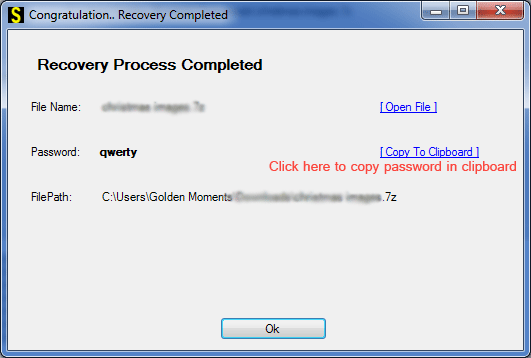
Now press the recover button to start the recovery process.
After recovery, use the clipboard function, pick the entire password in one click, and unlock 7Z files easily.
Free demo version
So any person can download it and recover the password of their 7Z file. SysInspire 7Z Password Recovery Software provides a free demo to all the users so that the users can know that this software works properly and it recovers three starting three characters for free.
Frequently Asked Questions
1. What is 7Z Password Recovery Software?
It is a tool used to recover forgotten 7Z file passwords.
2. Which recovery methods does SysInspire provide?
It provides Brute Force, Mask, and Dictionary Attack methods.
3. Is SysInspire 7Z Password Recovery free?
Yes, a free demo version is available to test the software.
4. How can I recover a 7Z password?
Select your 7Z file, choose a recovery method, and click Recover.
5. Which Windows versions are supported?
It supports Windows 11, 10, 8.1, 8, 7, XP, Vista, and other editions.
Conclusion
In this blog it is told how you can download this software and take advantage of its free demo and how you can use the tools of SysInspire 7Z Password Recovery Software and how you can use its three methods. You can also download it and try it right now.

