
Posted by sysinspire
Posted on: September 11, 2026
Categories: Uncategorized
Reading Time: 4 minutes
Introduction
In today’s blog, I’ll guide you through the process of Export OST Emails to PST in Outlook 2026 using a secure and efficient method. With the help of some excellent features, this task can be completed effortlessly, even by non-technical users, without any risk of data loss. Let’s explore how you can make this process smooth and hassle-free.
What is the difference between OST file and PST file?
OST file –
An Offline Storage Table (OST) file is stored on a server. This file can be accessed without using any data or an internet connection. It allows users to work offline, as it syncs with the server once the connection is restored. OST files are created in Outlook, but occasionally their connection with the server can break.
PST file –
A Personal Storage Table (PST) file, on the other hand, is a different format. It is primarily used for accounts like POP, IMAP, and webmail. Unlike OST files, PST files do not rely on a server connection, as they store data locally.
Export OST Emails to PST in Outlook
Do you want to Export OST Emails to PST in Outlook 2026 easily but are unsure how to do it? Now, you can use SysInspire OST to PST Converter Tool to effortlessly export your OST files to PST format.
This software offers many advanced features that are easy to use and completely risk-free. It is compatible with all Windows systems, making it accessible to anyone. Additionally, a free demo version is available for users to try before committing.
Best Features of SysInspire MBOX Converter Tool –
- This software is accessible to everyone, as it is available in multiple languages, making it suitable for both English and non-English users.
- The SysInspire OST to PST Converter tool is designed for both technical and non-technical users, making it easy for anyone to use.
- This software first scans the OST file and then proceeds with the conversion process in a few simple and easy-to-follow steps.
- Using this software ensures that no harm comes to any emails in the OST file, as it has been thoroughly tested by experts for reliability.
- With this software, you can export your OST file to various formats, including PST, EML, MSG, EMLX, HTML, and more.
- You can also export the OST file to cloud services like Yahoo Mail, Gmail, or Office 365.
- This software is very user-friendly, making it easy for anyone to use.
- This software also offers a 30-day guarantee, ensuring that if your OST file is not converted to PST for any reason, you can receive a full refund within 30 days.
- You can download this software on any Windows operating system, including Windows 11, 10, 8.1, 8, 7, XP, Vista, and other editions.
How to use SysInspire OST to PST Converter Tool?
First download this software by clicking on the download button
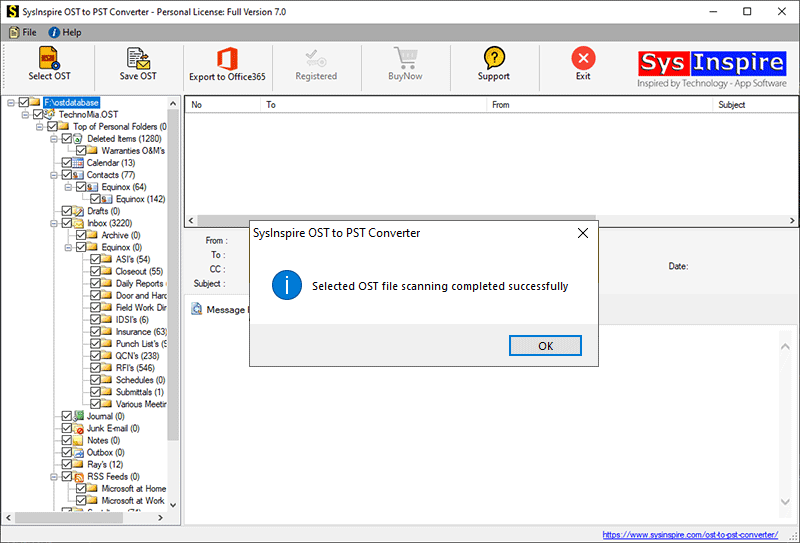
After downloading this software, click on the ost button.

Now select the file button and start the process of your OST.
Now select all your emails
Now within a few minutes your OST file will be converted to PST.
Free Demo Version
You can download the SysInspire OST to PST Converter tool and try its free demo, which is available for all users and can be used in any way. With the demo, you can convert up to 25 emails from OST to PST and verify that the software works properly.
Frequently Asked Questions (FAQ)
Can I import an OST file directly into PST?
No. PST does not provide a direct option to import standalone OST files. A professional OST migration tool is required.
Does the software migrate attachments safely?
Yes. All email attachments and important mailbox properties remain unchanged during migration.
Can I migrate multiple OST files?
Yes. The software supports both single and multiple OST file migration.
Can I preview OST emails before migration?
Yes. The preview feature allows users to check mailbox items before exporting them.
Does it support all Windows versions?
Yes. The software supports Windows 11, 10, 8.1, 8, 7, XP, Vista, and other editions.
Is a free demo version available?
Yes. Users can try the demo version to evaluate the migration process before purchasing the full version.
Conclusion
I hope you liked my blog, where I explained how you can Export OST Emails to PST in Outlook 2026 using the SysInspire OST to PST Converter tool. It comes with excellent features and poses no risk when using it. So, you should download it now and give it a try.

