
Introduction
If you are trying to migrate PST files to vCard but are unable to do so, today’s blog will help you accomplish this, as utilizing the tool and features described here is highly beneficial.
What is a PST file?
A PST (Personal Storage Table) file is created when you use Microsoft Outlook without an Exchange Server (such as with a POP account) or when you manually save or export data. This PST file stores emails, contacts, calendars, and other mailbox data on your local computer. It can be easily moved, backed up, and accessed even without an internet connection. It is commonly used for backing up data and transferring Outlook data from one system to another.
The Best Way to Convert PST Files to vCard
SysInspire PST to vCard Converter Software is an excellent solution that converts PST files to vCard with great ease. If you have been unable to convert your OST files, you can now convert them in simple steps using the software’s impressive features. Furthermore, there is no data loss involved, and the software is considered 100% risk-free.
Key features of SysInspire PST to vCard Converter software:
- It offers two options: you can convert a single PST file or multiple PST files.
- You can also convert PST files for use with Gmail, Yahoo Mail, and Office 365.
- It provides a live preview feature, allowing users to see the PST to vCard conversion process in real-time.
- Additionally, it can convert emails, contacts, calendars, notes, and more.
- It also includes a free demo that any user can try out at no cost.
How to use the SysInspire PST Converter tool?
Download the free PST recovery software from the official SysInspire website and install it on your computer.
After successfully installing the Outlook PST recovery software, launch the application.

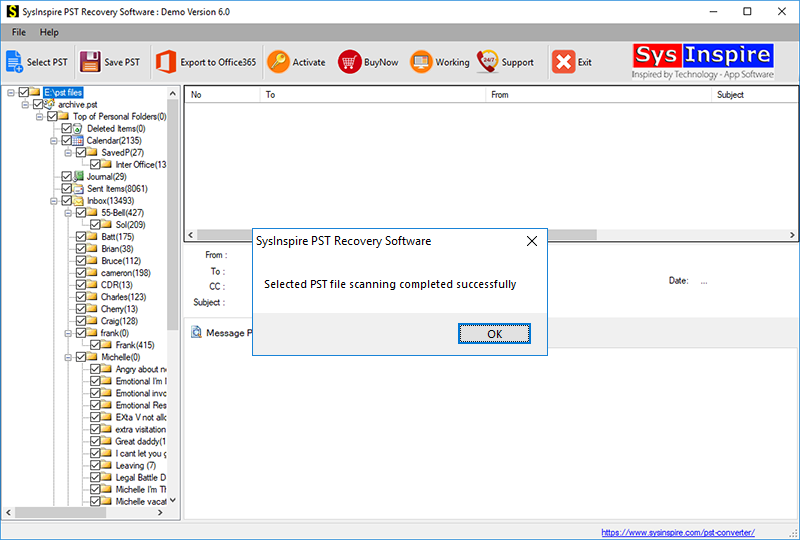
Click the “Select PST” button in the toolbar or the File menu.

Select your Outlook PST file by clicking the “Select PST file” button.
Once the Outlook PST file is selected, the software quickly scans and repairs it, allowing you to convert it into Vcard format.
FAQ – (Frequently Asked Questions)
On which systems can this software be downloaded?
You can download and try this software on any Windows operating system, whether new or old.
What are the benefits of using the free demo?
By using the free demo, you can convert 25 contacts from a PST file to vCard for free.
Can I convert the PST file to a file type other than vCard?
Yes, in just a few steps, you can convert the PST file into other formats or even export it to an email cloud service.
Conclusion
I hope today’s blog post has been very helpful to you and assisted you in successfully converting your PST files to vCards—especially by using the SysInspire PST to vCard Converter software, a tool that many users have employed to consistently achieve excellent results.

