
Posted by sysinspire
Posted on: October 12, 2026
Categories: 7z password, Password Recovery Tools
Reading Time: 5 minutes
Introduction
If you are also not able to Remove a Forgotten 7z File Password, then now you can remove the password of your 7zip file, that too within a few minutes. This will remove the password from your password-protected 7zip file and will solve a lot of your problems.
What is a 7z file?
A 7z file is a compressed file that puts multiple files into a single archive, making it easier to store and transfer large amounts of data. These files are both secure and efficient. Often, a 7z file is password protected to protect the user’s privacy and to keep the data inside it secure.
Choose the Right Solution to Recover Your Forgotten 7z File Password
By using this software, you can remove your password quickly. SysInspire 7z Password Recovery Software gives all users three great methods that help in removing your password-protected 7zip file. With its help, you can recover passwords in all types of characters so that no user faces any problems. In this, you also get the option of a 30-day money-back guarantee. By using this software, a lot of your problems will be solved.
Explore the Advanced Features of SysInspire 7z Password Recovery Software
- The software here is 100% safe. By using it, your data will not be harmed in any way because this software is tested by humans. You can use it without any tension.
- You can remove your password from your password-protected 7zip file in 2-3 steps without any hassle and this will save you time in removing the password.
- SysInspire 7z Password Recovery software can remove the password of your 7zip file in any language whether it is English or non-English and it removes it in all languages without wasting any time.
- With the help of this software, you can remove passwords in all types of characters whether it is an alphabetic character, numerical character, symbol character, or any other character.
- In this, you also get the function of copy to slipword, using which you can copy the password of your 7zip file in one click, which will help you remove the password from a protected file.
- The software supports all types of 7Z files and is also capable of removing passwords from them without damaging any data.
Three Easy Methods to Recover 7z Passwords
- Brute Force Attack:- You can remove passwords in all characters by using brute force attack methods. By using this method, you can remove it within 2-3 steps.
- Mask Attack:- This method recovers only a few characters and by using this method you get 100% results without losing any data.
- Dictionary Attack:- You can remove your 7zip password in a few steps using the dictionary attack method. This method removes the password in 3000+ English characters.
How to use SysInspire 7z Password Recovery Software?
Download this software by clicking on the above link.

After downloading click on the browser button

Now select your password protected 7zip.
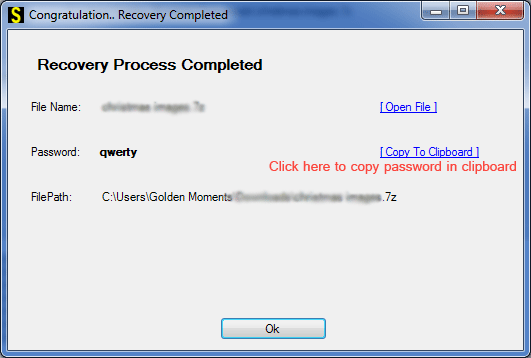
Now click on any one of the three methods given below.
You can open your password protected 7Zip file in just a few steps.
Free Demo Version
SysInspire 7z Password Recovery Software also provides a free demo to all users using which you can remove the first three characters of your 7zip file password and at the same time, users can get confidence in how our software works and how quickly it removes your password so that users do not face any kind of problem in removing the password of 7zip file.
Frequently Asked Questions (FAQs)
Q1. How can I recover a forgotten 7z file password?
You can use SysInspire 7z Password Recovery Software to recover a forgotten password using different recovery methods.
Q2. Which methods are available to recover a 7z password?
The software offers three methods: Brute Force Attack, Mask Attack, and Dictionary Attack.
Q3. Is SysInspire 7z Password Recovery Software safe to use?
According to the software provider, it is designed to recover passwords without damaging the data in your 7z archive.
Q4. Does SysInspire offer a free demo version?
Yes, the free demo allows users to test the software and recover the first three characters of a 7z file password.
Q5. Can I recover a 7z password containing special characters or numbers?
Yes, the software claims to support passwords containing letters, numbers, symbols, and characters from different languages.
Conclusion
Finally, SysInspire 7z Password Recovery Software provides three amazing methods to remove passwords from 7zip files so that you can recover passwords quickly. It supports all types of 7zip files and removes passwords in all types of characters. In this, you will also get the function of copying the clipboard so that it is easy to remove passwords. You can remove the 7zip password in any language. You can also try its free demo and download it to remove passwords from password protected file

