
Posted by sysinspire
Posted on: July 1, 2026
Categories: PST Converter, Uncategorized
Reading Time: 3 minutes
Do you also want to easily convert PST files to MSG format without any data loss? This blog post will prove very helpful; it provides complete information about the tool and explains how to use its various features for conversion without compromising data security.
What is a PST file?
A PST (Personal Storage Table) file is created when you use Microsoft Outlook without an Exchange Server (such as with a POP account) or when you manually save or export data. This PST file stores emails, contacts, calendar entries, and other mailbox data on your local computer. It can be easily moved, backed up, and accessed even without an internet connection. It is commonly used for backing up data and transferring Outlook data from one system to another.
How to easily convert large PST files to MSG format?
SysInspire PST to MSG Converter software comes with excellent and powerful features that any user can easily utilize. There is no risk involved in converting PST files to MSG format using this tool. It is suitable for both technical and non-technical users; additionally, a free trial version is available that anyone can use at no cost.
Key features of SysInspire PST to MSG Converter software
- MS Outlook is not required to convert PST files to MSG.
- It offers two distinct modes for converting single or multiple PST files.
- Export Outlook items—such as emails, contacts, calendars, tasks, and journals—to MSG format.
- Additionally, PST files can also be converted for use with Gmail, Yahoo Mail, and Office 365.
- Thanks to the graphical interface, the conversion process is effortless.
- You can even convert 25 emails from a PST file to MSG format for free via the free demo.
How to use SysInspire PST Converter Tool?
Download the free PST recovery software from the official SysInspire website and install it on your computer.
After successfully installing Outlook PST Recovery, open the software.

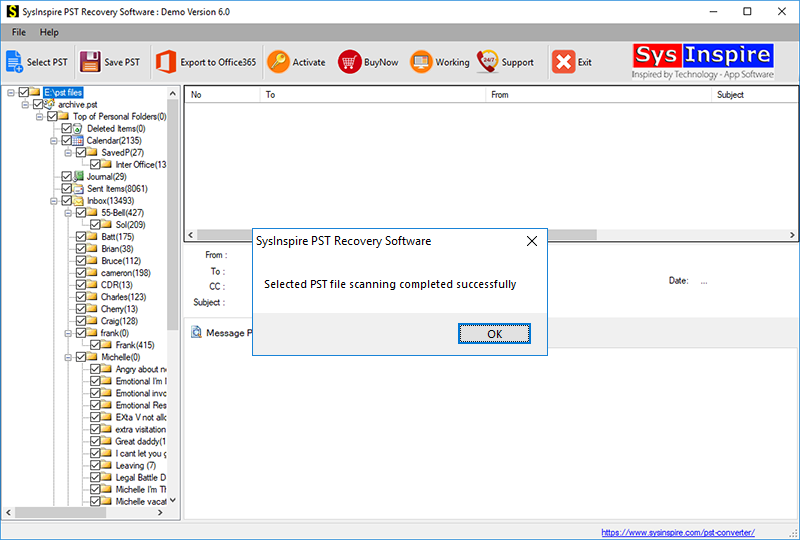
Click the “Select PST” button in the toolbar or the File menu.

Select your Outlook PST file by clicking the “Select PST file” button.
After selecting the Outlook PST file, the software quickly scans and repairs it, allowing you to convert it to MSG format.
Conclusion
I hope that through today’s blog post, you have learned how to convert your PST files to MSG format using the SysInspire PST to MSG Converter software. Many users have utilized this tool and achieved excellent results; therefore, I recommend that you download and try it out today.

