
Posted by sysinspire
Posted on: September 21, 2026
Categories: Uncategorized
Reading Time: 4 minutes
Introduction
Have you forgotten the password to your 7zip file, making it impossible to access the password-protected contents? Don’t worry! In this blog, I will introduce you to the best software solution to recover your zip file password and guide you on how to use it effectively. This software is not only powerful but also available at an affordable price, making it accessible to everyone.
What is a 7z File?
A 7z file is a compressed file that stores multiple files into a single archive, making it easier to store and transfer large amounts of data. These files are both secure and efficient. Often, a password is applied to a 7z file to protect the user’s privacy, ensuring that the contents remain safe and secure.
Open Password Protected 7Z Files
Now, any user can open 7zip password protected zip file within minutes using SysInspire 7z Password Recovery Software, packed with a variety of powerful features. This software offers three effective methods—Brute Force Attack, Mask Attack, and Dictionary Attack—that are easy to use for everyone. Additionally, it provides a free demo version, allowing users to try it at no cost.
Amazing features to Open 7zip Password Protected file
- You can use this software in many languages, be it English or non-English.
- SysInspire 7zip Password Recovery Software is both Technical and Non Technical.
- This software opens the 7zip file in easy steps only after scanning the 7zip file first.
- There is no risk of any kind in using this software because this software has been tested by humans before.
- This software is capable of opening all types of 7zip files because three best methods are used in it.
- If the password of your 7zip file has been recovered, then you can open your 7zip file by copying the password of the 7zip file in one click using the copy to clipboard option.
- If for some reason this software does not work then you can get your money back within 30 days and that too under 30 days money back guarantee.
- This software can run on all types of Windows OS:- Win11, Win10, Win8.1, Win8, Win7, WinXP, Vista and other editions.
Three Best Recovery Methods of SysInspire 7zip Password Recovery Software-
- Brute Force Attack – You can open your 7zip file in any type of characters using its brute force methods.
- Mask Attack – This methods recover some characters and open password protected zip file in a few minutes.
- The Dictionary Attack – This method first extracts English characters from the dictionary file and then opens the zip file and returns.
How to use SysInspire 7z Password Recovery Software?
Download this software by clicking on the above link.

After downloading click on the browser button

Now select your password protected 7zip.
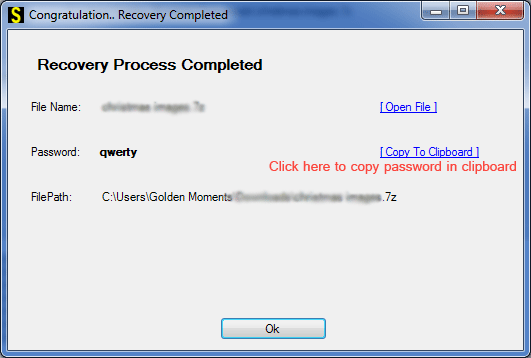
Now click on any one of the three methods given below.
You can open your password protected 7Zip file in just a few steps.
Free Demo Version
Now open zip password protected file using SysInspire 7zip Password Recovery Software. After downloading this software, you can also try its free demo which opens the first three characters for free. Along with this, its free demo also lets you know whether the software is working properly or not. To use its free demo.
Frequently Asked Questions
1. Can I recover a forgotten 7z file password?
Yes, if you have the right to access the archive, you can attempt to recover a forgotten password using password-recovery software such as SysInspire 7z Password Recovery. The available recovery methods include Brute Force, Mask, and Dictionary attacks.
2. Which password recovery methods are available in the software?
The software provides three recovery methods: Brute Force Attack, Mask Attack, and Dictionary Attack. You can select a method based on the information you remember about your password.
3. Can the software recover passwords from 7zip files in different languages?
Yes. The software supports password recovery for 7zip files containing passwords in multiple languages, including English and non-English characters.
4.What is a 7z file?
A 7z file is a compressed archive format used to store multiple files and folders in a single file. It helps reduce file size and can also be protected with a password for added security.
Conclusion
Have you been wondering how to unlock a password-protected 7z file? This blog provides a step-by-step guide on how to easily open your zip file using SysInspire 7z Password Recovery Software.
This software comes with many great features to ensure users face no difficulties while using it. It also provides detailed instructions on how to use its three recovery methods effectively. Download the software now from the link provided and give it a try!

