
Posted by sysinspire
Posted on: June 27, 2026
Categories: PST Converter, Uncategorized
Reading Time: 3 minutes
Do you want to convert PST files to Zimbra easily and securely but cannot find the right software? This blog post will be very helpful, enabling you to convert PST to Zimbra in very little time.
What is a PST file?
A PST (Personal Storage Table) file is an email data file format primarily used by Microsoft Outlook on Windows. Each PST file can store numerous email messages—including their headers, body content, attachments, calendar items, contacts, tasks, and original formatting. Using a reliable, professional conversion or migration tool is considered the safest and most accurate method for migrating PST data to platforms like Zimbra, Gmail, or Office 365 without data loss.
How to easily convert PST files to Zimbra?
SysInspire PST to Zimbra Converter Software comes with a range of features and smart capabilities. Any user can utilize this software without any hassle. Many users have employed this software and achieved excellent results. Furthermore, using this tool causes no harm to the PST file data, and you can easily download it.
Key Features of SysInspire PST to Zimbra Converter Software
- This tool offers options to convert one or multiple PST files.
- It performs the conversion of Outlook PST files to Zimbra without encountering any errors.
- Convert Outlook items—such as emails, contacts, calendars, tasks, notes, and journals—into Zimbra format.
- PST files can be converted not only to Zimbra but also to cloud-based email services like Office 365, Gmail, and IMAP.
- The tool features a user-friendly graphical interface, making it easy for anyone to use.
- A free trial version is available, allowing users to try the tool at no cost.
- You can use this tool on all versions of the Windows operating system by following simple steps.
How to use SysInspire PST Converter Tool?
Download the free PST recovery software from the official SysInspire website and install it on your computer.
After successfully installing Outlook PST Recovery, open the software-

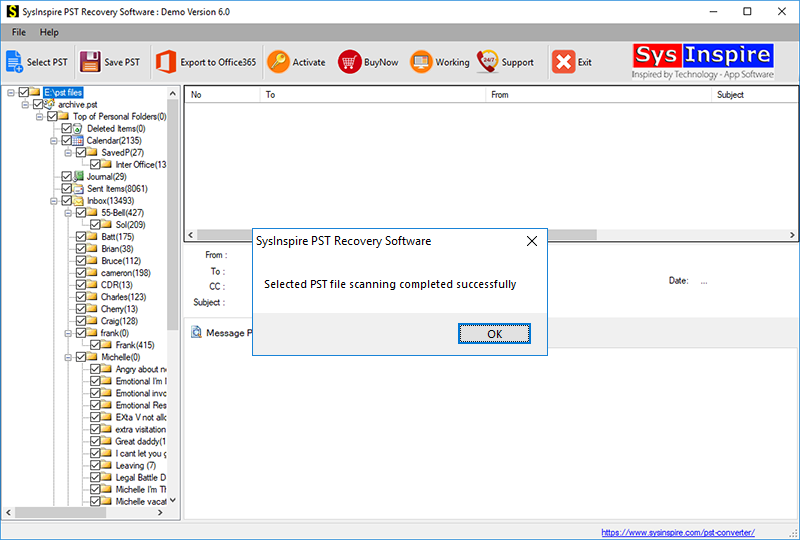
Click the “Select PST” button on the toolbar or in the File menu.

Select your Outlook PST file by clicking the “Select PST file” button.
After selecting the Outlook PST file, the software quickly scans and repairs it, allowing you to convert it to Zimbra .
Conclusion
I hope today’s blog post has given you a clear understanding of how to convert your PST files to Zimbra format using the SysInspire PST to Zimbra Converter software. So, download this tool from the provided link today and give it a try!

