
Introduction
How can you easily import PST files into MBOX? If this is your question, you can easily import PST files into MBOX by reading today’s blog, which explains how to use the software.
What is a PST file?
A PST (Personal Storage Table) file is an email data file format primarily used by Microsoft Outlook on Windows. Each PST file can store numerous email messages—including their headers, body content, attachments, calendar items, contacts, tasks, and original formatting. Using a reliable, professional conversion or migration tool is considered the safest and most accurate method for migrating PST data to platforms like Zimbra, Gmail, or Office 365 without data loss.
How to Convert PST files to MBOX easily?
SysInspire PST to MBOX Converter software is a robust and reliable tool that helps convert Microsoft Outlook PST files into MBOX format quickly and securely. This software supports all types of PST files (both ANSI and Unicode) and generates MBOX files that can be easily imported into email clients such as Mozilla Thunderbird, Apple Mail, Eudora, Entourage, Spicebird, SeaMonkey, Postbox, and others.
Key features of SysInspire PST to MBOX Converter software
- Convert one or multiple PST files to MBOX format simultaneously.
- Export only specific folders (Inbox, Sent, Drafts, Contacts, etc.).
- Emails, attachments, metadata (To, Cc, Bcc, Date, Subject), and formatting remain fully intact.
- Preview all emails and items before conversion.
- User-friendly interface: Suitable for all users with simple steps.
- Supports Windows 11, 10, 8, 7, and all versions of Outlook.
How to use the SysInspire PST Converter tool?
Download the free PST recovery software from the official SysInspire website and install it on your computer.
After successfully installing the Outlook PST recovery software, launch the application.

Click the “Select PST” button in the toolbar or the File menu.

Select your Outlook PST file by clicking the “Select PST file” button.
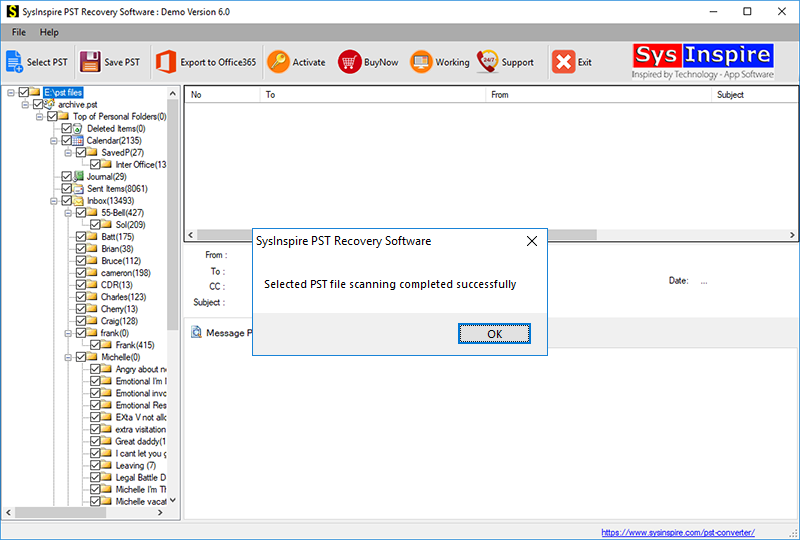
After selecting the Outlook PST file, the software quickly scans and repairs it, allowing you to convert it into MBOX format.
FAQ – (Frequently Asked Questions)
Is it necessary to have Outlook installed?
No, Microsoft Outlook does not need to be installed to run this software. It is a standalone tool.
Can I preview the emails before conversion?
Yes, you can view each email and its details in the software’s preview panel before conversion.
Is a free trial version available?
Yes, the free demo version allows you to convert the first 25 items of each folder into MBOX format. This enables you to check the performance beforehand.
Conclusion
Hopefully, you have learned how to convert PST files to MBOX using the SysInspire PST to MBOX Converter software. After reading today’s blog, you should have a clear understanding of how to utilize its features. Since many users rely on this tool, you can download it for free and try it out right away.

