
Posted by sysinspire
Posted on: October 26, 2026
Categories: 7z password, Password Recovery Tools
Reading Time: 6 minutes
Introduction
Open and unlock secure 7z archives with ease! In today’s blog, you will learn how to unlock 7z files quickly and efficiently. We explore excellent features and provide a comprehensive guide on how to open or unlock your 7z files without wasting any time.
what is a 7z file?
This 7Z file contains all your data in one file. This file saves a lot of your space and you can store all your data in one file. You can keep your file safe in it by applying a password. The 7Z file format is an efficient way to compress and store all your data into a single file, significantly saving storage space. Furthermore, you can enhance the security of your 7Z file by applying a password, ensuring that your data remains protected from unauthorized access. Whether for personal use or professional storage, the 7Z file format offers a reliable and secure solution.
Easy Way to Open and Unlock a Secured 7z with SysInspire 7z Password Recovery Software
All kinds of 7Z files passwords can be unlocked by using SysInspire 7Z Password Recovery Software, which is incredibly dependable and effective. It guarantees an uninterrupted, 100% safe recovery process in a few easy steps. Our software is built to handle even the most complicated passwords, and it promises results. We also provide a 30-day money-back guarantee, under which you can get a hassle-free refund if the software is unable to Open and Unlock a Secured 7z Archive. The ideal tool for recovering lost or forgotten passwords is SysInspire 7Z Password Recovery Software, thanks to its intuitive interface and strong recovery capabilities.
Explore Key Features of SysInspire 7z Password Recovery Software
- This 7Z password recovery software efficiently recovers passwords for all types of 7Z files. You can unlock your 7Z file quickly and save valuable time by utilizing advanced algorithms and methods. The software supports various recovery techniques, ensuring a high success rate in retrieving your password and making it a reliable and time-saving tool for accessing your encrypted 7Z files.
- Recover 7z file passwords as fast as possible by ranging passwords and applying many more settings with Methods- Mask Attack, Dictionary Attack, and Brute Force Attack. Recover 7Z file passwords swiftly by utilizing various methods such as Mask Attack, Dictionary Attack, and Brute Force Attack. These techniques allow you to range passwords and apply customized settings, enhancing the speed and efficiency of the recovery process. Whether dealing with simple or complex passwords, our software ensures a fast and effective recovery, helping you regain access to your encrypted 7Z files in no time.
- By using this tool, you can unlock 7zip password that include all types of characters, such as alphabetic, numeric, symbolic, and other special characters. This comprehensive approach ensures that no matter how complex your password is, the software can effectively retrieve it.
- This 7Z password recovery tool is very safe and reliable software that unlocks your password effectively. It is designed for human ease and ensures you can recover your 7Z file without any issues. Use this tool to recover your 7Z file effortlessly and securely.
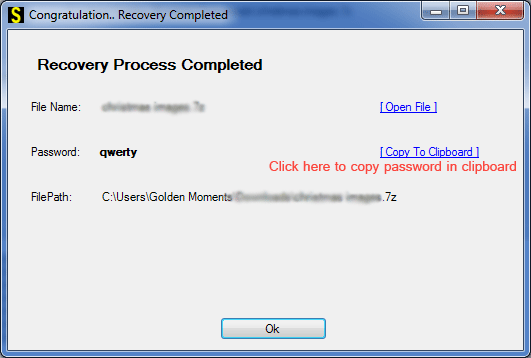
- This software includes a convenient copy-to-clipboard function, allowing you to copy the recovered password with a single click. This feature enables you to easily verify if your 7Z file is password-protected.
Three Easy Methods to Recover 7z Passwords
Brute Force Attack:- This method efficiently recovers all types of characters and retrieves the password for your 7Z file in just a few steps. It is highly effective in ensuring you regain access to your encrypted file quickly and easily.
Mask Attack:- If you know the last characters of your password, you can use the Mask Attack method to simplify the recovery process. This method narrows down the search, making it easier and faster to recover your forgotten 7Z file password.
Dictionary Attack:- This method utilizes a dictionary file with over 30,000 English words to aid in password recovery. By leveraging this extensive word list, you can quickly recover your 7Z file password.
How to use SysInspire 7z Password Recovery Software?
Download this software by clicking on the above link.

After downloading click on the browser button

Now select your password protected 7zip.
Now click on any one of the three methods given below.
You can open your password protected 7Zip file in just a few steps.
Free demo Version
Our company offers a Free Demo of our software, allowing you to recover the first three characters of your 7Z file password. This demo helps you verify the effectiveness of our tool at no cost. You can test its functionality without any charge, ensuring you can trust our software before making a purchase.
Frequently Asked Questions (FAQs)
1. What is a 7Z file?
A 7Z file is a compressed archive that stores multiple files in a single package and supports password protection.
2. How can I unlock a password-protected 7Z file?
You can use SysInspire 7Z Password Recovery Software to attempt to recover a forgotten 7Z archive password.
3. Which methods are available to recover a 7Z password?
The software offers three methods: Brute Force Attack, Mask Attack, and Dictionary Attack.
4. Is a free demo available for SysInspire 7Z Password Recovery Software?
Yes, the free demo allows you to recover the first three characters of the password to test the software.
5. Can I recover a 7Z password containing special characters?
The software supports password recovery attempts involving alphabetic, numeric, and special characters. Success depends on the password and recovery settings used.
Conclusion
Finally, SysInspire 7Z Password Recovery software offers three powerful methods to help Open and Unlock a Secured 7z Archive. It supports a wide range of characters and works with all languages. Our software is compatible with all types of 7Z files and includes convenient features such as a copy-to-clipboard function. Additionally, the free demo allows you to test the software by recovering the first three characters of your password, ensuring its effectiveness before purchase.

