Posted by sysinspire
Posted on: November 5, 2026
Categories: EML Converter, PST Converter
Reading Time: 4 minutes
Generally, users use MS Outlook for email communication and its default file format is PST for storing files. If we want to open Outlook files to other email clients supporting MBOX file format we want to Migrate PST to MBOX files. In this blog, we have written an automated method to convert Outlook .PST to MBOX Format files.
Overview
PST is the popular file format that stores data like emails, contacts, calendars, notes, tasks, etc. MBOX is the file format that stores all the emails, contacts, and calendars in a single file, in a concatenated way and is supported by email clients like Mozilla Thunderbird, Apple Mail, Entourage, etc.
If users want to migrate from MS Outlook email client to MBOX-supported email clients like Mozilla Thunderbird, Apple Mail, Entourage, etc you need to convert PST to MBOX files. You can use professional software that will ease your migration process and easily convert PST files to MBOX files.
Reasons to Migrate Outlook .PST to MBOX format
- MBOX file is supported by multiple email clients like Mozilla Thunderbird, Apple Mail, Entourage, etc.
- Managing MBOX files is easy and not risky.
- PST files are more prone to corruption when they exceed the maximum file limit leading to data loss.
- It is easier to transmit and retrieve data from MBOX files.
Best software to Migrate Outlook .PST to MBOX
The best software to Migrate Outlook PST to MBOX files is SysInspire PST Converter Software. The various advanced features of this software allows easy conversion of PST files to other file formats quickly with the few clicks.
Key features
- It allows the conversion of PST files into multiple file formats such as MBOX, MSG, EML, EMLX, HTML, PDF, etc.
- In the preview panel, you can view files and folders of the PST file and select the files and folders that you want to convert into other file formats.
- It allows to send PST file data to web-based email clients such as Gmail, Yahoo Mail, Office 365, and Outlook.com.
- It allows the splitting of large-size PST files into small-size PST files with the split feature.
- It can work with all Outlook editions up to 2019.
- It can work with all editions of the Windows Operating System such as Windows 11, 10, 9, 8.1, 8, 7, Vista, XP and older versions.
- It can repair corrupt PST files and recover items such as emails, calendars and contacts.
Steps to convert PST to MBOX Automatically
Download and launch PST recovery software in your system.

Click on the Select PST button from the menu bar.

Select the file and click the Next button to start the scanning process.
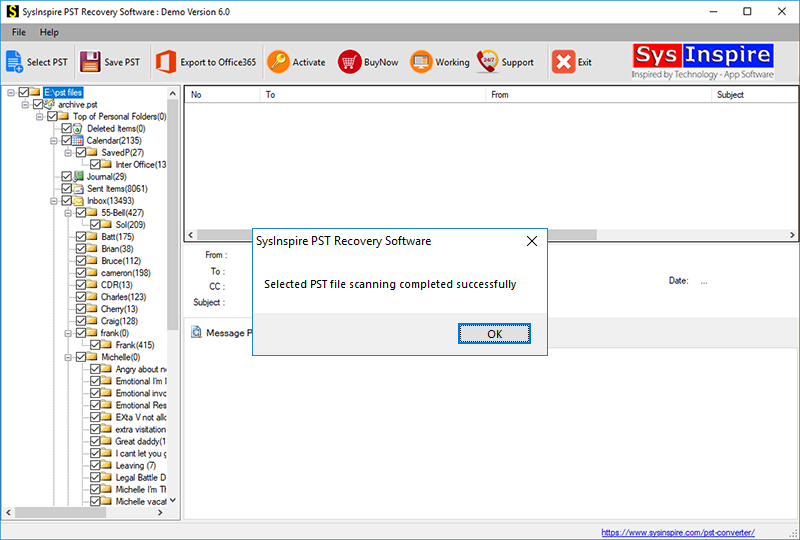
Get the preview of files/folders of the PST file, select the files and folders that you want to convert and press the save PST button.
Frequently Asked Questions (FAQs)
1. What is PST to MBOX conversion?
PST to MBOX conversion is the process of transferring Outlook emails from PST files into MBOX format for use in other email clients.
2. Which email clients support the MBOX file format?
Mozilla Thunderbird, Apple Mail, and Entourage are some popular email clients that support MBOX files.
3. Can I convert PST files to MBOX without losing emails?
Yes, using reliable PST converter software, you can convert PST files while preserving email data and folder structure.
4. Can I convert multiple PST files to MBOX format?
Yes, professional PST converter software allows users to select and convert PST files into MBOX format.
5. Does SysInspire PST Converter support corrupted PST files?
Yes, SysInspire PST Converter can repair corrupted PST files and recover emails, contacts, calendars, and other mailbox items.
Conclusion
In this blog, we have described reasons and automated methods to Outlook PST Emails to MBOX. There are manual methods also available but they are complex and require technical expertise. The SysInspire Outlook PST recovery software is professional software and in a few clicks, you can convert PST to MBOX files.