
Introduction
Are you looking to convert the PST file to a Zimbra desktop? Then you landed on the right page. In this blog, we have written an automated method to Migrate Outlook PST Emails to Zimbra Mailbox. It is the easiest and most reliable solution for converting PST files to Zimbra desktop.
PST & Zimbra- Overview
PST files are generated by Outlook when there is no internet connection between the Exchange Server and Outlook. When the user is offline, these files are created in Outlook, and Outlook is used to access the emails. If the user wants to migrate multiple PST files to another email client, then they have to use third-party software.
Zimbra Desktop
Zimbra Desktop is a free, open-source email platform that can be accessed online and offline. It can handle emails, contacts, calendars, etc.
Reasons to convert PST file into Zimbra
PST file corruption: PST files are more prone to corruption and more prone to virus attacks. It is recommended to export PST files to other email clients such as Zimbra.
Synchronization issues: PST files can be used by users when there is no direct internet connection available. If changes are made by the user in the PST file they are not synchronized with the Exchange server. So it is better to migrate the PST file to Zimbra, which synchronizes easily with the Exchange server.
Best Software to convert PST files to Zimbra
The best software to Migrate Outlook PST Emails to Zimbra is the SysInspire PST to Zimbra converter software. This application allows migration of PST files to Zimbra in two modes- Single PST file conversion and Bulk PST file conversion. It converts all corrupted, encrypted, and orphaned OST files to Zimbra quickly and effortlessly.
Key features
- It allows to preview of the inner contents of the PST file in the preview panel.
- This tool has an easy graphical user interface that allows technical and non-technical people to use it and migrate PST files to Zimbra with a few clicks.
- It moves PST files to Zimbra while maintaining all the email attributes and properties.
- It has an email filtering option that allows you to filter emails according to date by selecting Date Range(From and To).
- You can migrate PST files to other cloud-based applications such as Office 365, Yahoo Mail, Outlook.com, Gmail and other IMAP-based email clients.
- This safe and easy software is compatible with all editions of the Windows operating system such as Windows 11, 10, 8.1, 8, 7, Vista, XP and older versions.
Steps to Migrate Outlook PST Emails to Zimbra
Download, install and launch the PST to Zimbra converter software on your computer.
Click “Select PST” and choose from the conversion mode- Single OST file conversion and Bulk PST file conversion.

Add PST files from local drives and load them in the PST to Zimbra Converter software.

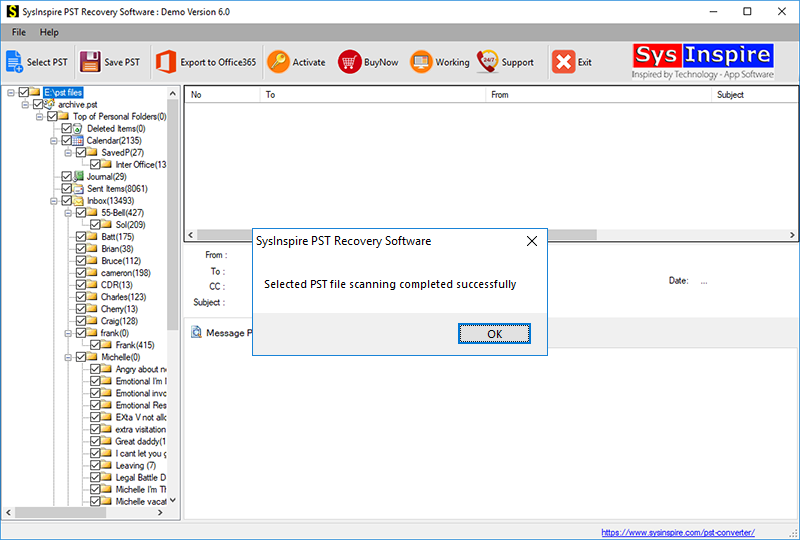
In the side panel, you can preview loaded PST files and folders.
Frequently Asked Questions (FAQs)
Q1. Can I migrate PST files to Zimbra?
Yes, you can easily migrate PST files to Zimbra using a PST to Zimbra Converter.
Q2. Can I convert multiple PST files to Zimbra?
Yes, the software supports bulk PST file conversion.
Q3. Does the software maintain email formatting?
Yes, it preserves email attributes and properties during migration.
Q4. Can I preview PST files before conversion?
Yes, you can preview PST emails and folders before migration.
Q5. Is the PST to Zimbra Converter compatible with Windows 11?
Yes, it supports Windows 11 and other Windows versions.
Conclusion
After reading this blog, you can easily Migrate Outlook PST Emails to Zimbra Mailbox with the automated method. You can download the software and try the demo version. In the demo version, you can convert 25 files of PST files to Zimbra.

