
Posted by sysinspire
Posted on: September 2, 2026
Categories: mbox to yahoomail
Reading Time: 4 minutes
Introduction
Have you been trying to Import MBOX Emails to Yahoo Mail for a long time but haven’t been able to? Well, today you can finally convert your MBOX file to Yahoo Mail by reading this blog, using simple steps and a tool that ensures no data loss.
What is an MBOX file?
An MBOX file is a popular email storage format used by Mozilla Thunderbird, Apple Mail, Eudora, Entourage, and many other email clients. It saves all emails in one file, which helps keep everything organized, but accessing or opening those emails directly in Yahoo Mail is not easy.
Best Way to Transfer MBOX Files to Yahoo Mail
Import MBOX Emails to Yahoo Mail using SysInspire MBOX to Yahoo Mail Converter software, a smart solution with features that have been successfully used by many users. You can convert unlimited emails, and this tool is suitable for both English and non-English speaking users. A free demo version is also available for download and trial.
Key features of SysInspire MBOX to Yahoo Mail Converter software
- Convert single and multiple MBOX files in an easy way.
- MBOX also provides a live preview before migrating the file so users can see it live.
- MBOX File supports all email clients like Thunderbird, Applemail, and others.
- Supports all Yahoo Mail servers like AOL.com, ZOHO Mail, IMAP, G-mail, etc.
- And after downloading this software, you can convert 25 emails from MBOX file to Yahoo Mail for free.
- Also, this tool can be run on all Windows systems like Win 11, 10, 8.1, 8, 7, XP, Vista, and other versions.
How to use SysInspire MBOX Converter Tool?
First of all, start by downloading the MBOX converter tool.
Go to ‘Add File’ on the home screen > Select the MBOX file and press ‘Next’.
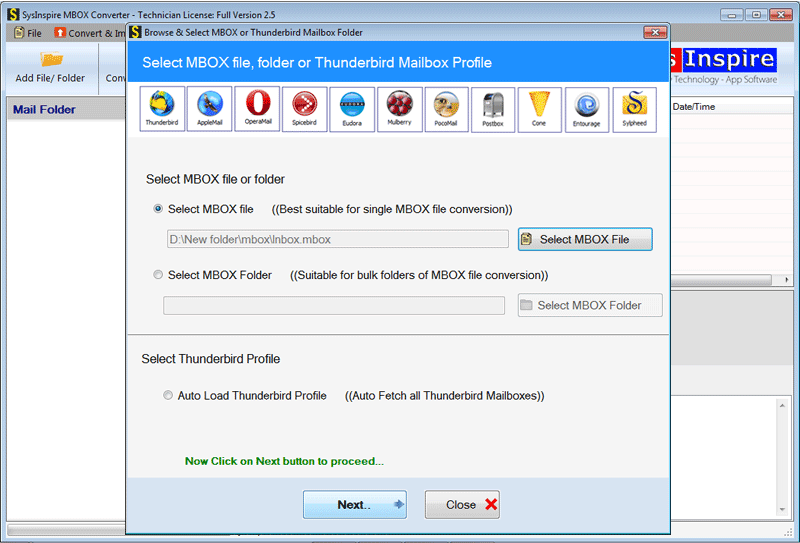
Once the file scanning is complete, all mailbox folders will appear on the screen.

You can specifically select folders by choosing the necessary ones and clicking on ‘convert MBOX’.
Under conversion, select PST to start converting MBOX data to PST format.

You have successfully completed the task of importing MBOX data into PST, but there is still one more step. This is because you need to import this new PST file—which contains all the data from the MBOX file—into Outlook.
FAQ – (Frequently Asked Questions)
Can I transfer multiple emails from a MBOX file to Yahoo Mail?
Yes, using this software you can migrate bulk from an MBOX file to Yahoo Mail in just a few steps.
Will using this software cause any harm to the emails in the MBOX file?
No, not at all. If you use this software, there will be no loss of any kind of data because this software has also been tested by humans.
Can I convert my MBOX file to something other than Gmail?
Yes, with just a few easy steps you can convert your MBOX file to Yahoomail, Office 365, and Imap.
What will happen if you use the free demo provided here?
You can convert up to 25 emails from MBOX file to Gmail for free using SysInspire MBOX to Gmail converter software.
Who can download this software on which Windows system?
After downloading this software you can run it on any Windows operating system like Win 10, 8.1, 8, 7, XP, Vista and other editions.
Is it possible to preview emails from MBOX before migration?
Yes, you can preview emails from MBOX before migration.
Conclusion
I hope you have read my entire blog post, which explains the features of this tool and how to use it. Import MBOX Emails to Yahoo Mail manually has become even easier with SysInspire MBOX Converter software. You get a fast, secure, and easy solution to transfer your emails to Yahoo Mail without any data loss.

