
Introduction
Are you looking for a reliable way to convert multiple EML files into a single PST file without losing your email data? Many users store their emails in EML format using email clients like Mozilla Thunderbird, Windows Live Mail, Apple Mail, and Outlook Express. However, if you want to access these emails in Microsoft Outlook, you’ll need to convert them into PST format.
In this guide, you’ll learn what an EML file is, why users convert EML files to PST, the limitations of manual methods, and a professional solution that enables secure batch conversion while preserving your email content, attachments, and other important properties.
What is an EML file?
An EML file is a standard email file format used by several desktop email applications, including Mozilla Thunderbird, Windows Live Mail, Apple Mail, Outlook Express, and many others. Each EML file stores a complete email message along with all of its associated information.
An EML file contains:
- Email message
- Sender and recipient information
- Subject line
- Date and time details
- CC and BCC fields
- Internet email headers
- HTML formatting
- embedded images
- file attachments
EML files are widely used for email backup, archiving, sharing, and transferring messages between different email clients.
Benefits of Converting EML Files to PST
Converting EML files into PST format offers several advantages, especially for Microsoft Outlook users.
Some key benefits include:
- Import multiple EML files into Microsoft Outlook.
- Combine multiple EML files into a single PST file.
- Preserve email formatting, attachments, and metadata.
- Simplify email management and organization.
- Make email migration faster and more efficient.
- Store emails in a format fully supported by Outlook.
- Reduce the effort required to manage large email collections.
Limitations of Manual Methods
Although some manual techniques are available for importing EML files into Outlook, they are only practical when working with a small number of emails.
Some common limitations include:
- Time-consuming for large numbers of EML files.
- Requires Outlook installation and manual importing.
- Multiple emails must be imported individually.
- Higher risk of missing important emails or folder structure.
- Not suitable for bulk email migration.
- Can become complicated for non-technical users.
Professional Solution to Convert Multiple EML Files into a Single PST
If you’re looking for a fast, secure, and accurate solution, SysInspire EML to PST Converter Software is an excellent choice. The software is specifically designed to convert single or multiple EML files into PST format while maintaining the original email structure and data integrity.
The tool preserves email content, attachments, sender and recipient information, subject, date, CC, BCC, internet headers, and other mailbox properties throughout the conversion process. Whether you’re converting a few emails or an entire mailbox, the software ensures smooth and error-free conversion.
Key Features of SysInspire EML to PST Converter
- Convert single EML files or complete folders.
- Merge multiple EML files into one PST file.
- Supports batch conversion without file size limitations.
- Preserves email formatting and folder hierarchy.
- Maintains attachments, metadata, and email properties.
- Built-in email preview before conversion.
- Simple interface suitable for both technical and non-technical users.
- Export EML files to PST as well as several other file formats.
- Supports migration to cloud email platforms such as Office 365, Gmail, Yahoo Mail, and IMAP.
- Compatible with all major Windows operating systems.
- Free demo version available for evaluation.
How to Use SysInspire EML to PST Converter?
Follow these simple steps to convert multiple EML files into a single PST file:
Step 1: Download and install SysInspire EML to PST Converter on your Windows computer. Launch the software after installation.

Step 2: Click Add EML Files or Add EML Folder, then browse your system and select the required EML files or folders.

Step 3: Preview your emails, including attachments, and verify the mailbox data before starting the conversion.
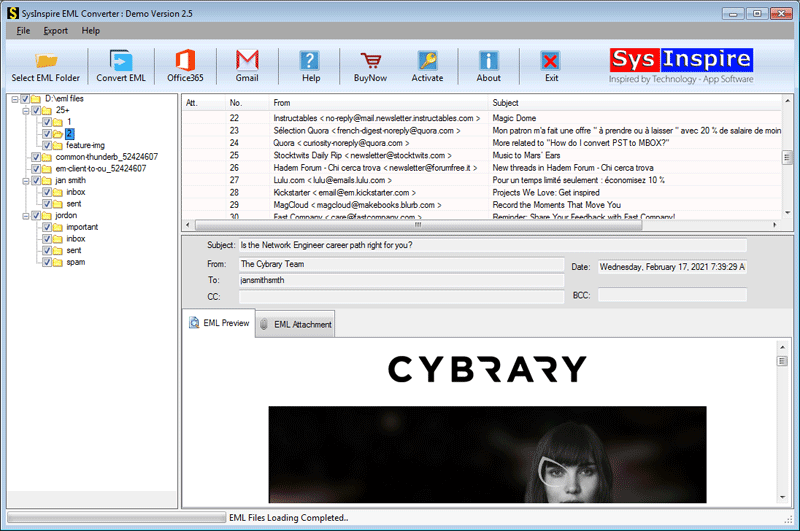
Step 4: Click Convert EML, choose PST as the output format, select the destination folder, and start the conversion process.

Step 5: After the conversion is completed successfully, the software displays a confirmation message indicating that all selected EML files have been exported to a single PST file successfully.

You can now import the generated PST file directly into Microsoft Outlook and access all your emails in one place.
Frequently Asked Questions (FAQs)
Can I convert multiple EML files into a single PST file?
Yes. The software supports batch conversion and allows you to merge multiple EML files into one PST file in a single operation.
Will attachments be preserved during conversion?
Yes. All email attachments, formatting, metadata, and mailbox properties are preserved throughout the conversion process.
Can I preview my emails before conversion?
Yes. The software includes a built-in preview feature that allows you to verify your emails before exporting them.
Which Windows versions are supported?
The software is fully compatible with Windows 11, Windows 10, Windows 8.1, Windows 8, Windows 7, Vista, XP, and other Windows editions.
Is a free trial available?
Yes. The free demo version allows users to convert up to 25 emails from each folder, enabling them to evaluate the software before purchasing the licensed version.
Conclusion
Converting multiple EML files into a single PST file is the most efficient way to migrate emails to Microsoft Outlook while keeping your mailbox organized. Although manual methods may work for a limited number of emails, they are not suitable for bulk conversion and often require significant time and effort.
SysInspire EML to PST Converter provides a fast, secure, and reliable solution by supporting batch conversion, preserving email content, attachments, and metadata, and generating Outlook-compatible PST files with complete accuracy. Whether you’re managing personal email archives or business mailboxes, this software simplifies the entire migration process while ensuring your data remains safe and accessible.

