
Introduction
Are you searching for a reliable way to import Outlook PST files into Zimbra? Many users migrate from Microsoft Outlook to the Zimbra Desktop or Zimbra Collaboration Suite for better email management and collaboration. However, transferring mailbox data manually can be complicated and may result in missing emails or incomplete data.
In this guide, you’ll learn what a PST file is, why users migrate PST to Zimbra, the limitations of manual methods, and an efficient solution to perform the migration while preserving all mailbox data.
What is a PST file?
A PST (Personal Storage Table) file is the default data file used by Microsoft Outlook to store mailbox information locally. It enables users to keep their Outlook data on their computer, making it easy to access emails even without an internet connection.
A PST file can store:
- Email messages
- Contacts
- calendar entries
- Tasks and Notes
- Attachments
- Journals
- Distribution Lists
- Other Outlook mailbox items
Because PST files contain complete Outlook mailbox data, they are commonly used for backup, migration, and long-term data storage.
Why Import PST Files into Zimbra?
There are several reasons why users choose to migrate PST files to Zimbra:
- Move Outlook mailbox data to the Zimbra platform.
- Access emails through Zimbra Desktop or Zimbra Collaboration.
- Consolidate Outlook mailbox data into a single Zimbra account.
- Simplify email management after switching email platforms.
- Preserve important emails, contacts, calendars, and attachments.
- Improve collaboration using Zimbra’s communication features.
Benefits of PST to Zimbra Migration
Migrating PST files to Zimbra offers several advantages:
- Transfers complete mailbox data.
- Preserves folder hierarchy during migration.
- Maintains email formatting and metadata.
- Supports emails, contacts, calendars, and attachments.
- Reduces the risk of data loss.
- Makes Outlook mailbox accessible in the Zimbra environment.
Limitations of Manual Methods
Although manual migration methods are available, they are not suitable for every user, especially when dealing with large PST files.
Some common limitations include:
- Lengthy and time-consuming process.
- Requires technical knowledge.
- Higher chances of manual mistakes.
- Risk of incomplete mailbox migration.
- Not suitable for bulk PST files.
- May require additional configuration steps.
Professional Solution to Import PST Files into Zimbra
If you’re looking for a faster and more reliable solution, SysInspire PST to Zimbra Converter Software provides an easy way to migrate Outlook PST files into Zimbra without data loss. The software converts complete mailbox data, including emails, contacts, calendars, attachments, and other Outlook items while maintaining the original folder structure.
Its simple interface makes the software suitable for both home users and IT professionals.
Key Features of SysInspire PST to Zimbra Converter
- Convert single as well as multiple PST files.
- Batch migration for faster processing.
- Preserves folder hierarchy and mailbox structure.
- Converts emails, contacts, calendars, and attachments.
- Built-in preview before conversion.
- Supports ANSI and Unicode PST files.
- Compatible with PST files created by all Outlook versions.
- Easy-to-use interface for technical and non-technical users.
- Works with Windows 11, 10, 8.1, 8, 7, Vista, XP, and earlier versions.
- Free demo version available for evaluation.
How to Use SysInspire PST Converter Tool?
Step 1:Download the SysInspire PST Converter from the official website and install it on your Windows computer. Once the installation is complete, launch the application.

Step 2:Click the “Select PST” button from the toolbar or File menu to browse and select your Outlook PST file.

Step 3:Choose the required PST file from your computer. The software will automatically scan and repair the selected PST file before loading the mailbox data.
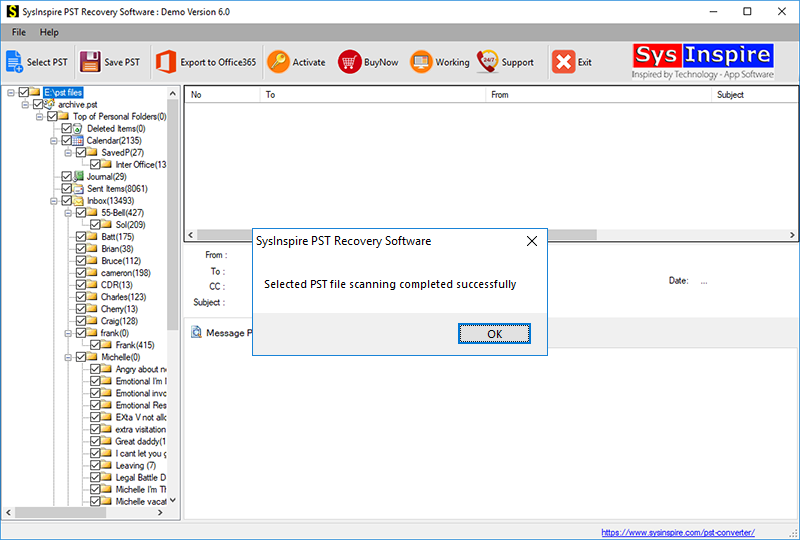
Step 4:After scanning is complete, preview the mailbox items. Select the required folders, choose Zimbra as the output format, specify the destination location, and click Convert to begin the migration process.
FAQ – Frequently Asked Questions
Can I import multiple PST files into Zimbra simultaneously?
Yes. The software supports batch conversion, allowing users to migrate multiple PST files in a single process.
Will my emails and attachments remain intact?
Yes. The software preserves email formatting, attachments, contacts, calendars, metadata, and folder hierarchy throughout the migration.
Can I preview mailbox data before conversion?
Yes. A built-in preview feature lets you review mailbox items before starting the conversion process.
Which Windows versions are supported?
The software is compatible with Windows 11, Windows 10, Windows 8.1, Windows 8, Windows 7, Vista, XP, and earlier versions.
Is there a free trial available?
Yes. The free demo version allows users to convert up to 25 emails from each folder for evaluation before purchasing the licensed version.
Conclusion
Migrating Outlook PST files to Zimbra is an effective way to move your mailbox data to a new email platform while keeping important information secure. Although manual methods may work for small migrations, they often become difficult when handling large PST files. A professional PST to Zimbra Converter simplifies the entire process by preserving mailbox integrity, supporting bulk migration, and ensuring a fast and accurate conversion. Whether you’re migrating a personal mailbox or multiple Outlook PST files, using a dedicated solution makes the process smooth, reliable, and hassle-free.

