
Introduction
Need to convert PST files into MSG format but don’t have Microsoft Outlook installed? Many users want to access individual Outlook emails in MSG format for backup, migration, legal purposes, or better email management. However, manually extracting MSG files from large PST files can be difficult, especially when Outlook is unavailable.
In this guide, you’ll learn what a PST file is, why users convert PST to MSG, the drawbacks of manual methods, and an efficient way to convert single or multiple PST files while preserving email properties and attachments.
What is a PST file?
A PST (Personal Storage Table) file is the default Outlook data file used to store mailbox information locally on a Windows computer. It keeps all Outlook items together in a single file, making it useful for backup, archiving, and data migration.
A PST file can contain:
- Email messages
- Attachments
- Contacts
- Calendar entries
- Tasks
- Notes
- Journal items
- Email headers
- Sender and recipient information
- Original formatting and metadata
Because a PST file stores complete Outlook mailbox data, it is widely used for transferring, archiving, and restoring Outlook information.
Why Convert PST Files to MSG?
There are several situations where converting PST files into MSG format becomes useful:
- Open individual Outlook emails separately.
- Save important emails as standalone MSG files.
- Share Outlook emails without sending the complete PST file.
- Organize Outlook emails more efficiently.
- Archive selected emails for future reference.
- Simplify email migration and document management.
Benefits of PST to MSG Conversion
Converting PST files to MSG provides several advantages:
- Complete compatibility with Microsoft Outlook.
- Saves every email as an individual MSG file.
- Preserves attachments and embedded content.
- Maintains email formatting and metadata.
- Keeps sender, recipient, subject, and date information intact.
- Makes searching and managing emails much easier.
Professional Solution to Convert PST to MSG Without Outlook
For users looking for a quick and reliable solution, the SysInspire PST to MSG Converter Software offers an efficient way to convert Outlook PST files into MSG format without requiring Microsoft Outlook. The software supports both single and batch conversion while preserving email content, attachments, metadata, and folder hierarchy throughout the process.
Its simple interface makes it suitable for both home users and IT professionals who need accurate Outlook email conversion.
Key Features of SysInspire PST to MSG Converter
- Convert single as well as multiple PST files into MSG format.
- Batch conversion support for faster processing.
- No Microsoft Outlook installation required.
- Preserves email formatting, attachments, and metadata.
- Maintains the original folder hierarchy.
- Preview mailbox data before conversion.
- Supports exporting PST files to Office 365, Gmail, IMAP, and other formats.
- Compatible with Windows 11, 10, 8.1, 8, 7, Vista, XP, and earlier versions.
- Free demo version available for evaluation.
How to Use SysInspire PST to MSG Converter?
Step 1: Download and install the SysInspire PST to MSG Converter on your Windows computer.

Step 2: Launch the software and click Select PST to browse and choose your Outlook PST file.

Step 3: The software automatically scans the selected PST file and displays all mailbox items.
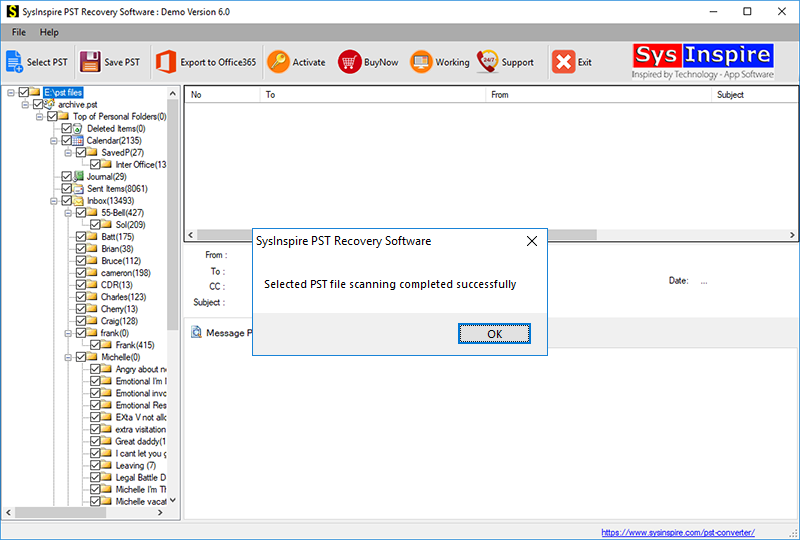
Step 4:Preview the mailbox data and select the emails or folders you want to convert.
Step 5:Choose MSG as the output format, specify the destination folder, and click the Convert button to begin the conversion.
Once the conversion is complete, all selected Outlook emails will be saved as individual MSG files with their attachments, formatting, and metadata preserved.
FAQ – Frequently Asked Questions
Can I convert multiple PST files into MSG at the same time?
Yes. The software supports batch conversion, allowing you to convert multiple PST files in a single process.
Is Microsoft Outlook required for conversion?
No. The software performs PST to MSG conversion without requiring Microsoft Outlook to be installed.
Will attachments remain intact after conversion?
Yes. All attachments, email formatting, headers, and metadata are preserved during the conversion.
Can I preview emails before converting them?
Yes. The built-in preview feature lets you view mailbox data before starting the conversion.
Does the software support exporting PST files to Office 365?
Yes. Besides MSG conversion, the software can also export PST files to Office 365, Gmail, IMAP, and several other formats.
Is a free trial available?
Yes. A free demo version is available that allows users to convert up to 25 emails from a PST file for evaluation purposes.
Conclusion
Converting PST files into MSG format is an effective way to manage Outlook emails individually while preserving their original content and properties. Although manual methods may work for a small number of emails, they become time-consuming and inconvenient when handling large PST files or bulk conversions. A dedicated PST to MSG converter simplifies the entire process by maintaining attachments, formatting, metadata, and folder structure. Whether you need to convert a single PST file or multiple Outlook mailboxes, using a reliable conversion solution helps complete the task quickly, securely, and accurately.

