
Introduction
EML files are commonly used to store individual email messages in email applications like Windows Live Mail, Mozilla Thunderbird, Apple Mail, and Outlook Express. However, there are situations where users need to extract email information from EML files into a CSV (Comma Separated Values) format for reporting, analysis, contact management, or data migration.
Since email clients do not provide a direct option to export EML files to CSV, a specialized conversion solution is often required. In this guide, you’ll learn what EML and CSV files are, why users convert EML to CSV, the limitations of manual methods, and the easiest way to perform the conversion without losing important email information.
What is an EML file?
An EML (Electronic Mail) file is a standard email file format used by several desktop email clients to store individual email messages.
An EML file may contain:
Email message, Sender and recipient details, Subject line, Date and time, CC and BCC information, Attachments, HTML formatting, Email headers
These files are commonly used for email backup, archiving, and transferring messages between compatible email applications.
What is a CSV File?
CSV (Comma Separated Values) is a simple text-based file format used to organize data into rows and columns. It is supported by applications such as Microsoft Excel, Google Sheets, database systems, and CRM platforms.
When email data is exported into CSV format, users can easily sort, filter, search, and manage mailbox information for business or personal use.
Why Convert EML Files to CSV?
There are several reasons why users may need to export EML files into CSV format, including:
- Generate email reports.
- Organize email information in spreadsheets.
- Import email data into CRM or database applications.
- Extract sender and recipient details.
- Maintain email records for auditing.
- Analyze large email collections more efficiently.
Benefits of EML to CSV Conversion
Converting EML files into CSV provides several advantages:
- Export email details into a spreadsheet format.
- Preserve sender, recipient, subject, and date information.
- Simplify email data management.
- Support bulk email analysis.
- Easy import into business applications.
- Save mailbox information in a universally supported format.
- Improve accessibility and reporting.
Is There Any Manual Method to Convert EML to CSV?
There is no direct manual method available to convert EML files into CSV format. Most email applications do not include a built-in feature for exporting EML files as CSV.
Although some users attempt to copy email information manually or use multiple applications, these approaches can be slow, inefficient, and impractical for large numbers of emails.
Drawbacks of the Manual Approach
Manual conversion comes with several limitations:
- No direct EML to CSV export option.
- Requires significant manual effort.
- Time-consuming for large email collections.
- Higher possibility of incomplete data extraction.
- Attachments are not included in CSV files.
- Increased chances of human error.
- Not suitable for business or enterprise-level conversions.
Professional Solution to Convert EML Files to CSV
For users looking for a faster and more dependable solution, SysInspire EML to CSV Converter Software provides an easy way to export email information from EML files into CSV format.
The software supports both individual EML files and complete folders while preserving essential email properties throughout the conversion. Its simple interface makes it suitable for both personal users and IT professionals.
Key features of SysInspire EML to CSV Converter software:
- Convert EML files directly into CSV format.
- Supports single as well as batch conversion.
- Export complete email information accurately.
- Preserves sender, recipient, CC, BCC, subject, and date fields.
- Extract phone numbers and email addresses from emails.
- Maintains original email formatting during processing.
- Compatible with all major Windows operating systems.
- Free trial version available for evaluation.
How to Convert EML Files to CSV?
Step 1: Download and install the SysInspire EML to CSV Converter on your Windows computer.

Step 2: Launch the software and click Select EML Folder or Select EML File to add your email data.
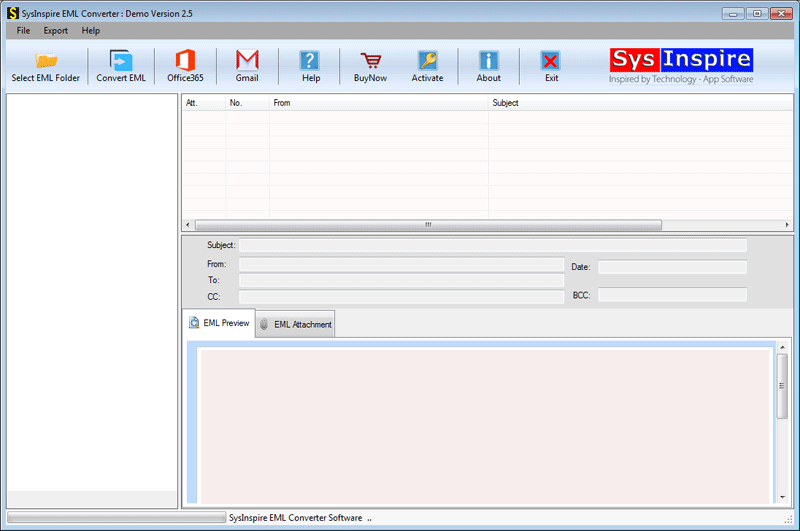
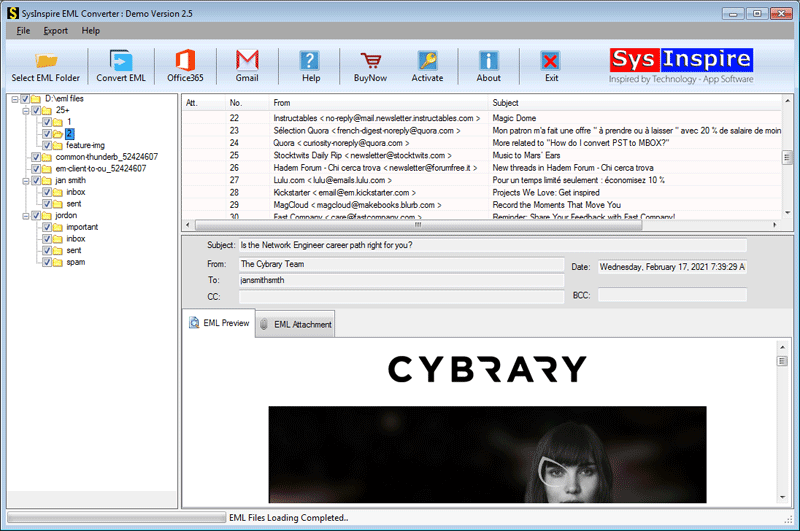
Step 3: The software scans the selected files and displays the mailbox for preview.

Step 4: Select the required folders or email items, choose CSV as the output format, and configure the desired options.
Step 5: Choose the destination folder and click Convert to start the export process.
After the conversion is complete, open the generated CSV file in Microsoft Excel, Google Sheets, or any compatible application.
FAQ – Frequently Asked Questions
Can I convert multiple EML files at once?
Yes. The software supports batch conversion, allowing you to convert multiple EML files into CSV in a single operation.
Will the email details remain intact?
Yes. Important email information such as sender, recipient, subject, date, CC, and BCC fields is preserved during conversion.
Can I preview emails before converting?
Yes. The software provides a preview feature so you can review mailbox data before starting the conversion.
Does the software extract email addresses and phone numbers?
Yes. It includes options to extract email addresses and phone numbers from EML files.
Is there any file size limitation?
No. The software is capable of processing both small and large EML files efficiently.
Is a free trial available?
Yes. A free demo version is available so users can evaluate the software before purchasing the full version.
Conclusion
Converting EML files into CSV format is an effective way to organize email information for reporting, analysis, business applications, and record management. Since most email clients do not offer a direct EML to CSV export option, using a reliable conversion tool helps simplify the entire process while preserving important email details. A dedicated EML to CSV converter allows users to process both individual and multiple EML files quickly, making email data more accessible and easier to manage.

