
Introduction
If you have email messages stored in EML files and want to access them in IBM Lotus Notes, you’ll first need to convert them into the NSF format. Since EML and NSF are designed for different email platforms, they are not directly compatible with each other. Attempting to open EML files in Lotus Notes without conversion is not possible.
This guide explains why EML to NSF conversion is required, the challenges involved, and the easiest way to perform the migration while keeping your emails, attachments, and folder structure intact.
What is an EML file?
EML is a standard email file format used by several desktop email applications to save individual email messages. Every EML file contains the complete email, including the message body, sender and recipient details, subject, attachments, and other internet headers.
Popular email clients that support EML files include:
Windows Live Mail
Mozilla Thunderbird
Outlook Express
Windows Mail
eM Client
Apple Mail (exported emails)
Although EML files are easy to access in supported applications, they cannot be imported directly into IBM Lotus Notes because Lotus Notes uses the NSF database format.
What is an NSF File?
NSF (Notes Storage Facility) is the primary database format used by IBM Lotus Notes (HCL Notes). It stores emails, contacts, calendars, journals, tasks, and other mailbox information in a structured database.
Since Lotus Notes only recognizes NSF databases, users must convert their EML files before importing them into the application.
Why Convert EML to NSF?
There are several reasons why users choose to convert EML files into NSF format:
- Move emails from Thunderbird to Lotus Notes.
- Migrate Windows Live Mail data into IBM Lotus Notes.
- Access archived EML emails in an NSF database.
- Consolidate emails from different email clients.
- Preserve important business emails during migration.
- Maintain email formatting and attachments.
- Simplify mailbox management inside Lotus Notes.
Benefits of Converting EML to NSF
Converting EML files into NSF provides several advantages:
- Allows seamless migration to IBM Lotus Notes.
- Preserves original email formatting.
- Keeps attachments associated with each email.
- Maintains email metadata such as sender, recipient, and timestamps.
- Supports bulk email migration.
- Reduces the risk of manual errors.
- Organizes emails into a Lotus Notes-compatible database.
- Makes long-term email management easier.
Manual Method to Convert EML to NSF
Unfortunately, there is no built-in manual method that directly converts EML files into NSF format. Since EML and NSF belong to different email platforms, users usually have to rely on multiple applications, manual imports, or complicated migration procedures that often fail to preserve the original mailbox structure.
Because of these limitations, most users prefer a dedicated conversion solution for accurate and reliable migration.
Limitations of Manual Conversion
The manual approach comes with several drawbacks:
- No direct EML to NSF conversion option.
- Multiple applications may be required.
- Time-consuming for large numbers of EML files.
- Increased possibility of missing emails.
- Attachments may not migrate correctly.
- Folder hierarchy can be affected.
- Not suitable for business mailbox migration.
- Requires technical knowledge.
Professional Solution for EML to NSF Conversion
For users looking for a faster and more reliable approach, SysInspire EML to NSF Converter Software offers a simple way to convert EML files into Lotus Notes NSF format.
The software is designed to migrate single or multiple EML files while preserving email content, attachments, formatting, metadata, and folder organization. Its easy-to-use interface makes the conversion process straightforward for both home users and IT professionals.
Key features of SysInspire EML to NSF Converter software
- Convert EML files directly into NSF format.
- Support bulk conversion of multiple EML files.
- Preserve email attachments throughout the migration.
- Maintain original folder hierarchy.
- Keep email formatting and internet headers intact.
- Preview mailbox items before conversion.
- Support EML files created by major email clients.
- Simple interface suitable for beginners and professionals.
- Compatible with Windows 11, 10, 8.1, 8, 7, Vista, and XP.
- Free trial version available for evaluation.
How to use the SysInspire EML to NSF Converter Tool?
Install and open the EML converter software on your system.

Click the ‘Select EML Folder’ button on the software’s initial screen.
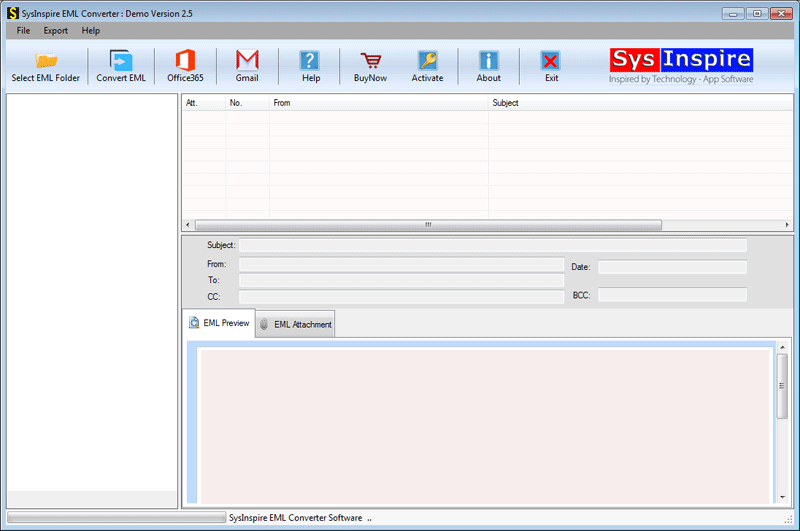
When you select the file, the tool scans it to analyze the data of the entire file.

Select the EML folders you want to convert to NSF format. Then, tap on ‘convert EML.
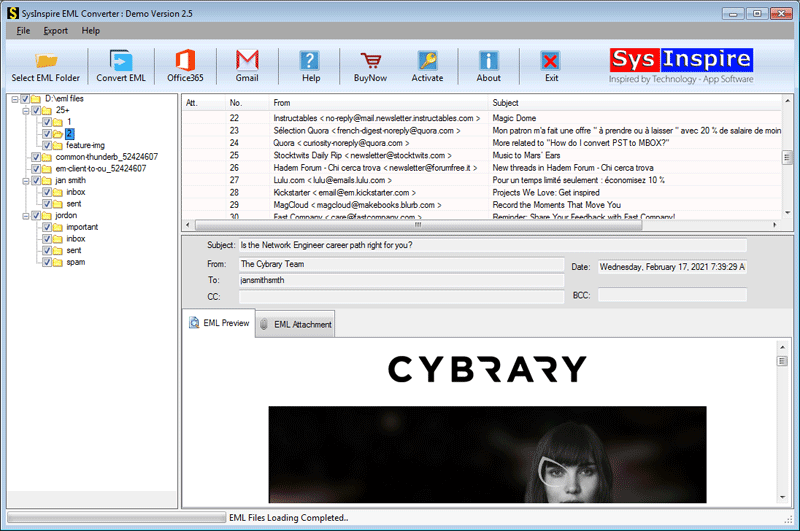
On the next screen, select the option to export to NSF [Lotus Notes] and click on Convert.
FAQ – (Frequently Asked Questions)
Can I convert multiple EML files together?
Yes. The software supports batch conversion, allowing multiple EML files to be converted into a single process.
Will my attachments be preserved?
Yes. Email attachments remain associated with their respective messages during conversion.
Can I preview emails before exporting?
Yes. The built-in preview feature lets you verify mailbox items before starting the conversion.
Is there any file size limitation?
No. The software supports converting both small and large EML files efficiently.
Which email clients create compatible EML files?
The software supports EML files generated by Windows Live Mail, Thunderbird, Outlook Express, Windows Mail, and several other email applications.
Is a free trial available?
Yes. A free trial version is available so users can evaluate the software before purchasing the licensed edition.
Conclusion
Converting EML files to NSF is essential for users who want to access their emails within IBM Lotus Notes. While manual approaches are either unavailable or highly complicated, a professional converter simplifies the entire process by securely migrating emails, attachments, and folder structure without affecting the original data. Choosing a reliable conversion solution helps ensure a smooth, accurate, and hassle-free migration experience.

