Are you searching for a way to import PST to Gmail without Outlook? If yes, then you don’t need to worry. This blog will help you guide the best method to import PST to Gmail without Outlook. This blog will explore the automated solution of importing PST files to Gmail. But before discussing the solution let’s overview PST files and Gmail.
Introduction of PST and Gmail
A PST (Personal Storage Table) file is a data file used by Microsoft Outlook to store emails, contacts, calendar events, tasks, and other Outlook data. It is used to transfer emails and other data between computers. It is also used for backing up Outlook data and storing offline data for POP3 and IMAP email accounts.
Gmail is a popular email client that offers better security and easy graphical user interface. It offers a wide array of tools and services like Google Calendars, Meet, Drive, Docs, Sheets & Slides. It enables users to access emails from anywhere and anytime.
Advantages of Importing PST Files to Gmail
- Some benefits that Gmail provides for importing PST files are:
- Once PST files are imported to Gmail you can access them from anywhere and anytime with the internet.
- PST files are stored on the computer and Gmail stores emails on the cloud hence it frees up your computer storage space.
- Gmail provides advanced security features and spam filtering for imported files.
- Unlike Outlook PST files, Gmail does not suffer from file corruption issues.
Best Way to Import PST to Gmail Without Outlook
SysInspire Outlook PST recovery software is the easiest and smartest solution to import PST to Gmail without Outlook. This tool enables users to migrate emails, contacts, calendars, notes, tasks, etc from PST files to Gmail accounts easily and efficiently. Users can migrate multiple PST files in bulk to a Gmail account with a few clicks. Moreover, this tool allows to convert PST files to various other file formats that can be opened in various email clients and migrate PST files to different cloud-based applications.
Features of Outlook PST Recovery Software
- Capable of converting PST files into multiple file formats such as MBOX, MSG, EML, EMLX, HTML, etc.
- In the preview panel, you can view files and folders of the PST file and select the files and folders that you want to convert into other file formats.
- Migrate PST file data to web-based email clients such as Gmail, Yahoo Mail, Office 365, and Outlook.com account.
- Allows the splitting of large-size PST files into small-size PST files with the split feature.
- Enables to work with all Outlook editions up to 2019 (32/64 bit).
- Compatible with all editions of the Windows Operating System such as Windows 11, 10, 9, 8.1, 8, 7, Vista, XP and older versions.
- Repair corrupted PST files and recover data items such as emails, calendars and contacts.
How to import PST to Gmail without Outlook?
Download and launch SysInspire Outlook PST recovery software in your system.

Click on the Select PST button from the menu bar.

Select the file and click the Next button to start the scanning process.
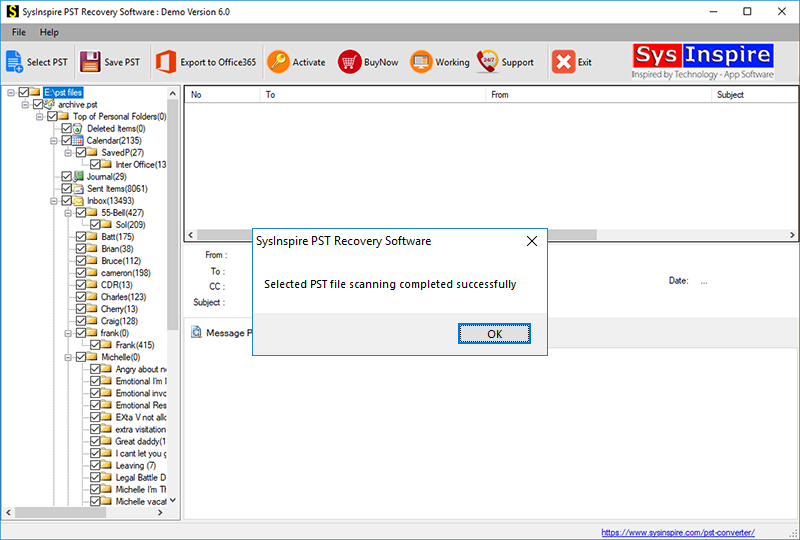
Get the preview of files/folders of the PST file, select the files and folders that you want to convert and press the save PST button.
Frequently Asked Questions (FAQs)
1. Can I import PST files to Gmail without Outlook?
Yes, you can import PST files to Gmail without installing Microsoft Outlook by using a third-party PST migration tool.
2. What data can I import from PST to Gmail?
You can import emails, contacts, calendars, notes, and other data stored in PST files.
3. Can I import multiple PST files to Gmail at once?
Yes, some PST migration tools support bulk importing of multiple PST files into a Gmail account.
4. Is it safe to import PST files to Gmail?
Yes, Gmail provides security features such as spam filtering and account protection. However, always use a trusted migration tool.
5. Do I need Outlook installed to convert PST files to Gmail?
No, you can use third-party PST converter software to convert and migrate PST files to Gmail without Outlook.
Conclusion
Gmail has various advantages over saving than the PST files. In this blog, we have described the automated method, that is easy to use and with a few clicks, you can do conversion and migration in the software. It is the software that is recommended by IT industry experts.