
Introduction
If you have been trying to convert PST files to EML format without success so far, this blog post will help you convert your PST files to EML in very little time, without any data loss.
What is a PST file?
A PST (Personal Storage Table) file is created when you use Microsoft Outlook without an Exchange Server (such as with a POP account) or when you manually save or export data. This PST file stores emails, contacts, calendars, and other mailbox data on your local computer. It can be easily moved, backed up, and accessed even without an internet connection. It is commonly used for backing up data and transferring Outlook data from one system to another.
The best way to convert PST files to EML
Many users trust the SysInspire PST to EML Converter Software; it offers excellent features that allow PST files to be converted to EML in just a few steps. Moreover, this software provides a very simple method for conversion and includes a free demo that any user can try out at no cost.
Key Features of SysInspire PST to EML Converter Software
- Using this software, you can convert PST files containing unlimited emails and attachments into EML files.
- Convert all emails from a PST file to EML format with just a few clicks.
- It offers a preview panel option to view the PST file contents before conversion.
- Convert PST files into various other formats in addition to EML.
- You can convert up to 25 emails from any PST folder to EML format for free.
- This tool is compatible with all Windows operating systems, including Windows 11, 10, 8.1, 8, 7, XP, Vista, and other versions.
How to use SysInspire PST Converter Tool?
Download the free PST recovery software from the official SysInspire website and install it on your computer.
After successfully installing Outlook PST Recovery, open the software-

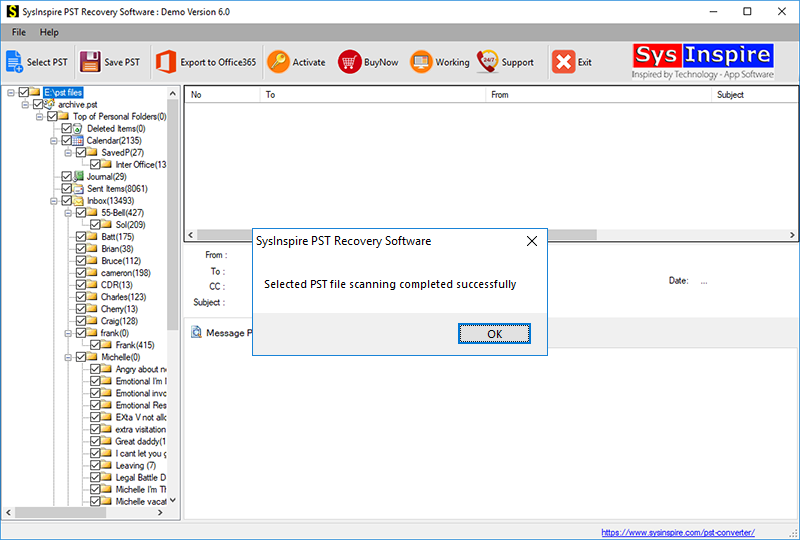
Click the “Select PST” button from the toolbar or the File menu.

Select your Outlook PST file by clicking the “Select PST file” button.
After selecting the Outlook PST file, the software quickly scans and repairs it, allowing you to convert it to Office 365.
FAQ – (Frequently Asked Questions)
Can I convert multiple emails from a PST file to EML format at once?
Yes, you can convert multiple emails from a PST file to EML format in a few simple steps.
Can any user utilize this tool?
Yes, both technical and non-technical users can use this software.
Conclusion
From today’s blog post, you have surely learned how to migrate your PST files to EML format using the SysInspire PST to EML Converter software—a tool whose features have been explained here in detail. In fact, many users have utilized this tool and achieved excellent results.

