
Posted by sysinspire
Posted on: August 25, 2026
Categories: Password Recovery Tools
Reading Time: 5 minutes
Introduction
In this blog, I will show you how to Recover Forgotten 7Z Archive. If you have forgotten the password of your 7z zip file and cannot remember it, and now want to recover the password, then this guide will help you.
What is a 7z File?
A 7z file is a compressed file that stores multiple files into a single archive, making it easier to store and transfer large quantities of data. These files are both secure and efficient. Frequently, a password is applied to a 7z file to protect the user’s privacy, ensuring that the contents remain safe and secure.
How to Recover a Password from 7z File?
Recovering password from your 7z file is now easier than ever. Using SysInspire 7z Password Recovery software, you can easily recover or remove the password of your 7z file. This software is risk-free and offers three powerful methods: Brute Force Attack, Mask Attack, and Dictionary Attack. Each of these methods works differently to help you unlock your file, and there’s even a free demo available to try before you buy.
Best Features of SysInspire 7z Password Recovery Software:
- Available in Multiple Languages: SysInspire 7z Password Recovery software is available in multiple languages, making it suitable for both English and non-English speaking users.
- Risk-Free: This software has been thoroughly tested and is safe to use. There is no risk of data loss during the password recovery process.
- Easy Extraction: It allows you to extract the contents of your 7z file in a few simple steps, and you can easily Recover passwords from any type of 7z file.
- User-Friendly: Designed with both technical and non-technical users in mind, the software is easy for anyone to use.
- Supports All Character Types: You can recover passwords containing any type of character, including alphabets, numbers, symbols, and other special characters.
- Copy to Clipboard: The software features a convenient “Copy to Clipboard” option, making it easy to use with just a single click.
- Money-Back Guarantee: If the software fails to work for any reason, you can claim a refund within 30 days under the money-back guarantee policy.
Available Password Recovery Methods
Brute Force Attack:
If you have no information about your 7z file’s password, this method attempts every possible combination of characters to discover it. It works with any combination of characters.
Mask Attack:
This method is faster than a brute-force attack and is useful when you know part of the password. It focuses on a specific set of characters, significantly speeding up the process. To recover the password in just a few minutes, you simply need to define a “mask” (pattern)—such as the password’s length or specific characters.
Dictionary Attack:
This method is highly effective, especially when the password consists of a common word or phrase. The software searches through a dictionary file, attempting to match the password against more than 30,000 English words. It is the best method for quickly recovering passwords made up of common words or simple phrases.
How to use a SysInspire 7zip Password Recovery Software?
Download this software on your Windows Systems.
After downloading, open this software in your system.

Select your 7zip file by clicking on the browser button.

After this, choose any one of the three methods: Brute Force Attack, Mask Attack, and Dictionary Attack.

You can remove a password from 7zip file using its three easy steps which is very easy for all users.
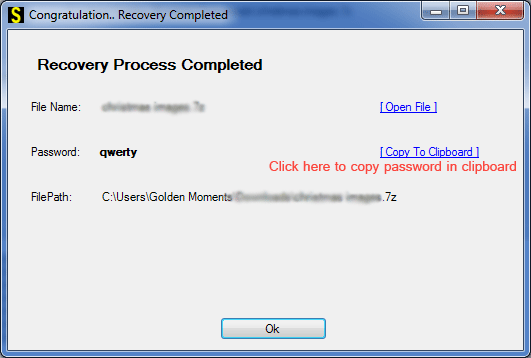
A free demo is also available for all users.
To use the free demo, first download the software onto your Windows system. Any user can try it for free, which also helps confirm that the software functions correctly. With the free demo, you can recover the first three characters of the password for a 7z file.
Frequently Asked Questions
1. Can I recover a forgotten password from a 7Z file?
Yes. If you have forgotten the password of a 7Z archive, password recovery software such as SysInspire 7z Password Recovery can help you recover it using different recovery methods.
2. What methods are available for recovering a 7Z password?
SysInspire 7z Password Recovery provides three methods: Brute Force Attack, Mask Attack, and Dictionary Attack. You can choose a method based on how much you remember about the original password.
3. Which 7Z password recovery method should I use?
If you have no information about the password, Brute Force Attack can be used. If you remember some characters or the password pattern, Mask Attack can be more suitable. For common words or phrases, Dictionary Attack may provide faster results.
4. Is SysInspire 7z Password Recovery easy to use?
Yes. The software is designed for both technical and non-technical users. You simply select your 7Z file, choose a suitable recovery method, and start the recovery process.
5. Is there a free demo available for SysInspire 7z Password Recovery?
Yes. A free demo is available for users who want to test the software before purchasing it. According to the provided information, the demo can recover the first three characters of the 7Z archive password.
Conclusion
Learn how to use the SysInspire 7z password recovery software in just 2 to 3 simple steps. This blog explains the three available methods and highlights the best features for Recover Forgotten 7Z Archive. Additionally, this user-friendly software ensures data security and runs smoothly on all Windows operating systems. Download and try it today!

