
Introduction
Are you looking for an easy way to Import PST to MBOX format? Many users need to migrate their Outlook mailbox data to email clients that support MBOX, such as Mozilla Thunderbird, Apple Mail, SeaMonkey, or Opera Mail. However, since Microsoft Outlook stores mailbox data in PST format while many other email clients use MBOX, users often face compatibility issues during migration.
In this guide, you’ll learn the easiest methods to Import PST to MBOX format. We’ll also discuss a professional solution that helps migrate your Outlook mailbox securely while preserving emails, attachments, contacts, calendars, and folder hierarchy.
What is the Difference Between PST and MBOX?
PST File
A PST (Personal Storage Table) file is the default Outlook data file used by Microsoft Outlook to store mailbox information locally. It contains emails, contacts, calendars, notes, journals, tasks, and attachments. PST files are commonly used for backing up Outlook data, archiving old emails, and transferring mailbox information between Outlook profiles or computers.
Since PST is a proprietary Microsoft format, it is not directly supported by most non-Microsoft email applications.
MBOX File
MBOX is one of the most widely used email storage formats supported by various desktop email applications, including Mozilla Thunderbird, Apple Mail, SeaMonkey, Opera Mail, Eudora, and many others. Instead of storing each email separately, MBOX keeps multiple email messages in a single file, making mailbox management simple and organized.
Because Outlook does not support MBOX files natively, users often need to convert PST files before accessing their mailbox data in MBOX-supported email clients.
Why Do Users Need to Convert PST to MBOX?
There are several situations where users need to convert PST files into MBOX format.
- Switch from Microsoft Outlook to Thunderbird or Apple Mail.
- Migrate Outlook mailbox data to another email client.
- Open Outlook emails on macOS-supported applications.
- Preserve old Outlook emails for long-term storage.
- Transfer mailbox data to Linux-based email clients.
- Access archived Outlook emails without Outlook.
- Consolidate mailbox data in MBOX-supported applications.
Benefits of Converting PST Files to MBOX
Migrating PST files to MBOX offers several advantages.
- Compatible with multiple email applications.
- Easy migration from Outlook to Thunderbird.
- Supports cross-platform email access.
- Preserves mailbox organization.
- Makes email backup and restoration easier.
- Provides long-term mailbox accessibility.
- Allows easy transfer between different operating systems.
- Helps reduce dependency on Microsoft Outlook.
Manual Method to Convert PST to MBOX
Microsoft Outlook does not include a built-in option to export PST files directly into MBOX format. However, users can perform the conversion manually by using Mozilla Thunderbird along with the ImportExportTools NG add-on.
Steps
- Install Microsoft Outlook on your computer.
- Install Mozilla Thunderbird.
- Configure the same email account in Thunderbird.
- Allow Outlook and Thunderbird to synchronize mailbox data.
- Install the ImportExportTools NG extension in Thunderbird.
- Import Outlook mailbox folders.
- Export the selected mailbox folders as MBOX files.
Although this method may work for smaller mailboxes, it becomes complicated and time-consuming for large PST files.
Limitations of the Manual Method
The manual approach has several drawbacks.
- No direct PST to MBOX conversion option.
- Requires Microsoft Outlook installation.
- Thunderbird configuration is mandatory.
- Multiple applications are required.
- Time-consuming for large mailbox files.
- Higher risk of incomplete migration.
- Folder hierarchy may not always remain intact.
- Not suitable for non-technical users.
Best Solution for Instant PST to MBOX Migration
If you want to Import PST to MBOX quickly and securely, SysInspire PST to MBOX Converter Software offers a simple and reliable solution. This software is designed to export Outlook PST mailbox data directly into the MBOX format without altering the original data.
It supports emails, attachments, contacts, calendars, notes, journals, and tasks while preserving the original folder structure and email properties. The software features a user-friendly interface, enabling both novices and professionals to perform mailbox migration with ease. Users can also preview mailbox items before starting the conversion process to ensure the correct data has been selected.
Key features of SysInspire PST to MBOX Converter software
- Convert PST files directly into MBOX format.
- Supports both ANSI and Unicode PST files.
- Export emails with attachments.
- Convert contacts, calendars, notes, journals, and tasks.
- Maintain original folder hierarchy.
- Preserve email formatting and metadata.
- Preview mailbox items before conversion.
- Supports selective mailbox conversion.
- Batch conversion of multiple PST files.
- User-friendly interface suitable for all users.
- Compatible with Windows 11, 10, 8.1, 8, 7, Vista, and XP.
- Free demo version available for evaluation.
How to use the SysInspire PST Converter tool?
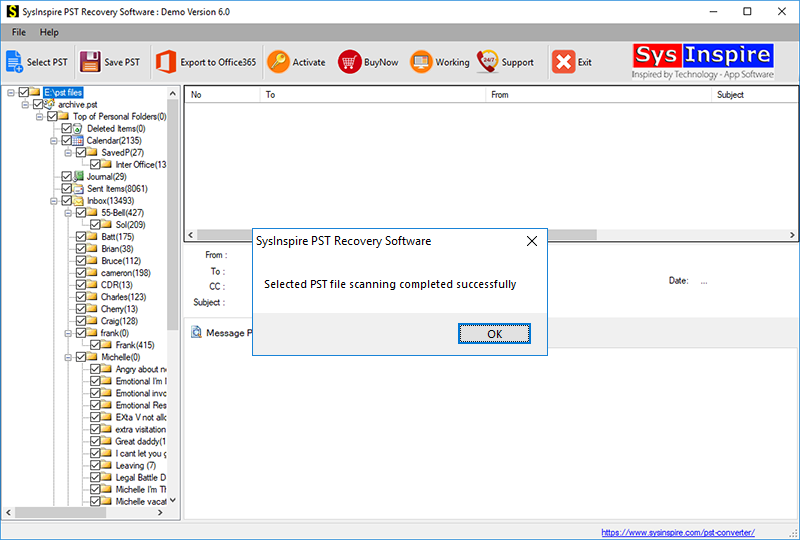
Download the free PST recovery software from the official SysInspire website and install it on your computer.
After successfully installing the Outlook PST recovery software, launch the application.

Click the “Select PST” button in the toolbar or the File menu.

Select your Outlook PST file by clicking the “Select PST file” button.
After selecting the Outlook PST file, the software quickly scans and repairs it, allowing you to convert it into MBOX format.
Frequently Asked Questions (FAQ)
Can I convert multiple PST files into MBOX at once?
Yes. The software supports batch conversion, allowing you to migrate multiple PST files in a single process.
Will my email attachments remain intact after conversion?
Yes. All email attachments, formatting, metadata, and folder hierarchy are preserved during the conversion.
Can I preview emails before converting them?
Yes. The software provides a live preview feature that allows you to review mailbox items before exporting them.
Does the software support password-protected PST files?
Yes. It supports password-protected PST files, provided the correct password is supplied.
Which email clients support the exported MBOX files?
The exported MBOX files are compatible with Mozilla Thunderbird, Apple Mail, SeaMonkey, Opera Mail, Eudora, Mulberry, and several other MBOX-supported email applications.
Is a free demo version available?
Yes. A free demo version is available that allows users to evaluate the software and convert a limited number of emails before purchasing the licensed edition.
Conclusion
Import PST to MBOX is often necessary when migrating from Microsoft Outlook to email clients that support the MBOX format. Although manual methods are available, they can be complex, time-consuming, and may not be suitable for large mailbox files. A professional solution like SysInspire PST to MBOX Converter Software simplifies the entire migration process by securely converting Outlook mailbox data while preserving folder structure, email properties, and attachments. By choosing the right conversion method, users can quickly access their Outlook emails in any MBOX-supported email application without data loss.

